
Geometric Construction of a Hyperbola Definition in GeoGebra
Loading the math board and drawing, please wait…
In collections
COORDINATE GEOMETRY
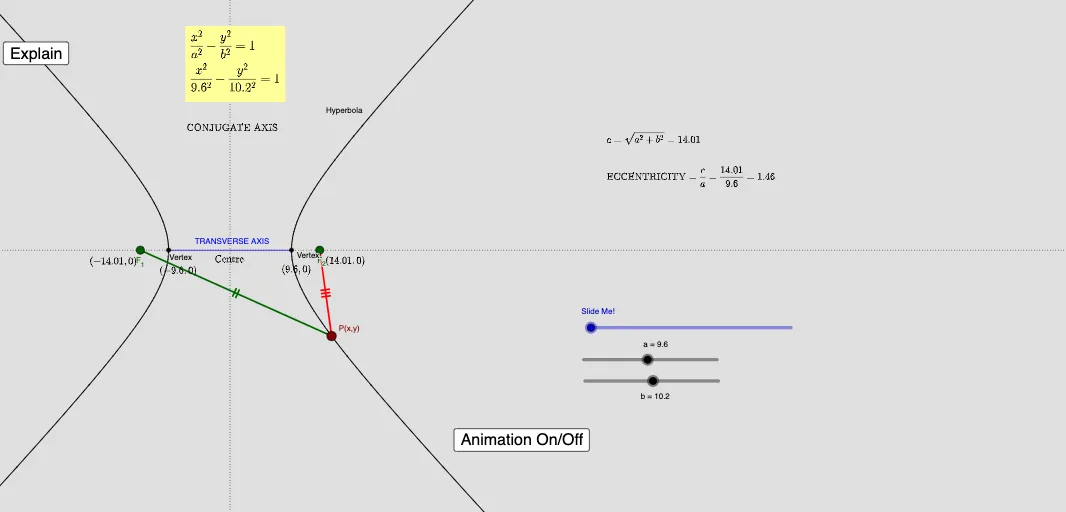
This GeoGebra example demonstrates how to construct and visualize the geometric definition structure of a hyperbola, focusing on relationships among foci and key points such as vertices and the center. The core math concepts include the hyperbola’s defining focus-based properties (distance-difference geometry), the placement of foci and vertices, and how geometric transformations help generate symmetric components. Construction highlights (from the provided “construction summary”) include using commands such as Focus and Vertex to create the focal/vertex framework, Segment to draw supporting lines, Point and Vector for defining and manipulating key points and directions, Translate, Rotate, and Dilate to generate corresponding symmetric/scale-related elements, Angle to control directional constraints, Center to locate the geometric center, Circle to create auxiliary circles, and Intersect to compute intersection points used in the construction. The object set includes entities like foci (F_1, F_2), center (C), and multiple derived points obtained via transformation. Suitable for upper-secondary and early college students studying coordinate geometry and geometric construction, especially for illustrating how the hyperbola definition can be made concrete through dynamic geometry.
GeoGebra Commands & Parameters
Focus(c) → F_1, F_2Vertex(c) → C, D, E, FSegment(C, D) → dTranslate(C, (0, b + 4)) → C'Translate(D, (0, b + 4)) → D'Point(c) → GSegment(G, F_1) → eSegment(G, F_2) → fTranslate(C, (b + 4, 0)) → C'_1Vector(C, C') → uVector(D, D') → vDilate(C, If[0 < n < 1, 1 - n, 0], C') → C'_2Dilate(D, If[0 < n < 1, 1 - n, 0], D') → D'_2Segment(C'_2, D'_2) → lDilate(F_1, If[1 < n < 2, 2 - n, 1], C') → A'Vector(F_1, A') → wTranslate(G, w) → G'Segment(A', G') → mSegment(C, D) → pAngle(F_2, F_1, G) → αRotate(A', If[1 < n < 2, ((-(2 - n)) * α)], A') → A''Rotate(A', If[1 < n < 2, ((-(n - 2)) * α), 0], A'') → A''_1Rotate(A', If[1 < n < 2, ((-(n - 1)) * α), (-α)], A') → A''_2Rotate(G', If[1 < n < 2, ((-(n - 1)) * α), (-α)], A') → G''Segment(A''_2, G'') → m'Circle(C', e) → qIntersect(q, l, 1) → HSegment(C', H) → rSegment(F_1, G) → sDilate(F_2, If[2 < n < 3, 3 - n, 1], D') → B'Vector(F_2, B') → tTranslate(G, t) → G'_1Translate(G, t) → G'_2Translate(F_2, t) → B'_1Segment(G'_2, B'_1) → f'Angle(G, F_2, F_1) → βSegment(H, D') → a_1Segment(G, F_2) → b_1Center(c) → ADilate(A, If[1 < n < 2, 2 - n, 0], C') → A'_1Vector(F_1, A'_1) → u_1Translate(A, u_1) → A'_2Translate(G, u_1) → G'_3Segment(A'_2, G'_3) → e_1Angle(D, F_1, G) → γRotate(A'_2, ((-(n - 1)) * γ), A'_2) → BRotate(G'_3, ((-(n - 1)) * γ), A'_2) → IDilate(G, If[2 < n < 3, 3 - n, 0], D') → G'_4Vector(G, G'_4) → v_1Translate(A, v_1) → A'_3Translate(G, v_1) → G'_5Segment(A'_3, G'_5) → g_1Rotate(A'_3, If[2 < n < 3, ((-(n - 2)) * γ)], G'_4) → JRotate(G'_5, If[2 < n < 3, ((-(n - 2)) * γ)], G'_4) → KCircle(C', Distance[A''_2, G'']) → k_1Intersect(k_1, i_1, 2) → NSegment(C', N) → j_1Vector(F_2, O) → w_1Translate(G, w_1) → G'_6Translate(F_2, w_1) → LSegment(G'_6, L) → f'_1Circle(N, f) → p_1Rotate(G'_6, If[2 < n < 3, ((n - 2) * β)], O) → MRotate(L, If[2 < n < 3, ((n - 2) * β)], O) → L'Segment(M, L') → l_1Segment(N, D') → m_1Dilate(C', If[3 < n ≤ 4, 4 - n], C) → C''Dilate(D', If[3 < n ≤ 4, 4 - n], D) → D''Segment(C'', D'') → n_1
AI Drawing Prompt Reference
Draw a hyperbola with foci F1 and F2, center C, and vertices D and E. First, define the foci F1 and F2, then locate the center C and vertices D and E. Use transformations like translation, rotation, and dilation to generate symmetric elements and lines. Finally, construct the hyperbola based on these elements.
The prompt above was compiled from the original drawing commands and is for reference only.