
Eccentricity-Guided Conic Curve Construction
Loading the math board and drawing, please wait…
In collections
COORDINATE GEOMETRY
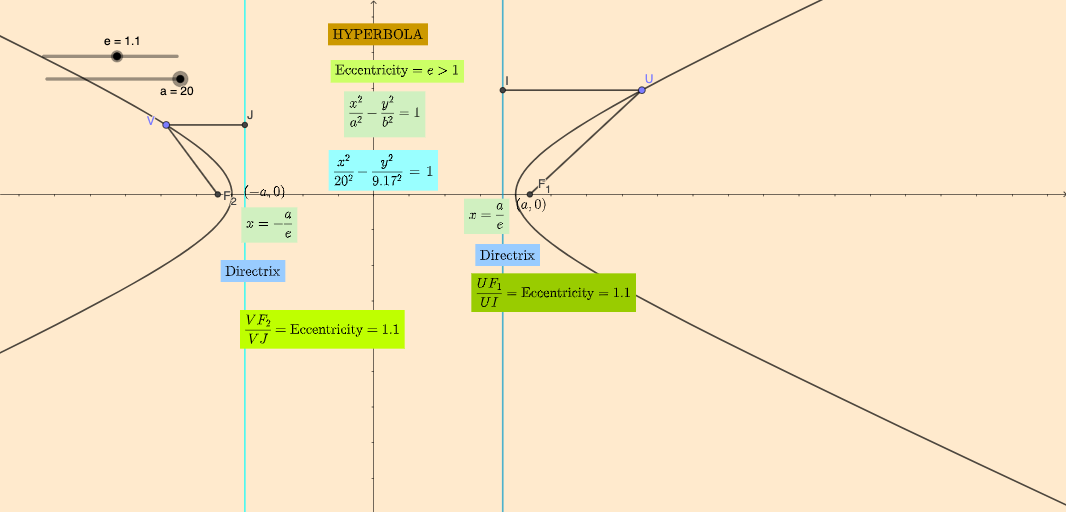
This example demonstrates how eccentricity (e) controls the geometry and visual behavior of a conic section by focusing on distances to key points such as foci and constructing the resulting configuration. The main mathematical ideas are the definition/role of eccentricity, focal distance relationships that determine the conic’s shape, and geometric construction techniques that translate parameters (e, a, b, c) into measurable structure. Construction highlights include using GeoGebra commands If for conditional logic, Point and Segment to create and connect defining points and measuring segments, OrthogonalLine to build perpendicular auxiliary lines, and Intersect to compute crucial intersection points that determine the final loci/geometry. The model organizes several equation/condition objects (eq1, eq2, eq3), uses focal points (F1, F2), and employs interactive/animated elements (animP, animQ and buttons) to link parameter changes to the curve’s properties. Suitable for high school to early university learners in analytic geometry and conic sections, especially for exploring how eccentricity changes the curve’s “spread” and for practicing dynamic geometric modeling in GeoGebra.
GeoGebra Commands & Parameters
If(e > 1, sqrt(c^(2) - a^(2)), sqrt(a^(2) - c^(2))) → bPoint(eq1) → PSegment(P, F_{1}) → gOrthogonalLine(P, eq2) → hIntersect(h, eq2) → ESegment(P, E) → iIntersect(eq3, xAxis) → FIntersect(eq2, xAxis) → GPoint(eq1) → QOrthogonalLine(Q, eq3) → jIntersect(eq3, j) → HSegment(Q, F_{2}) → kSegment(Q, H) → lPoint(eq5) → UPoint(eq5) → VOrthogonalLine(U, eq2) → fIntersect(f, eq2) → ISegment(I, U) → mSegment(U, F_{1}) → nOrthogonalLine(V, eq3) → pIntersect(p, eq3) → JSegment(V, J) → qSegment(V, F_{2}) → r
AI Drawing Prompt Reference
Draw a geometric construction of an ellipse. Include two foci, F1 and F2, and an ellipse curve. The construction should start from the foci, using distance measurements and auxiliary lines to define the ellipse. Key points such as P, E, F, G, Q, H, U, and V should be connected through intersections and perpendicular lines. The overall figure should illustrate the shape and focus relationship of the ellipse, suitable for learning its geometric properties.
The prompt above was compiled from the original drawing commands and is for reference only.