
Ellipse Exploration with Orthogonal Construction and Length Constraints
Loading the math board and drawing, please wait…
In collections
COORDINATE GEOMETRY
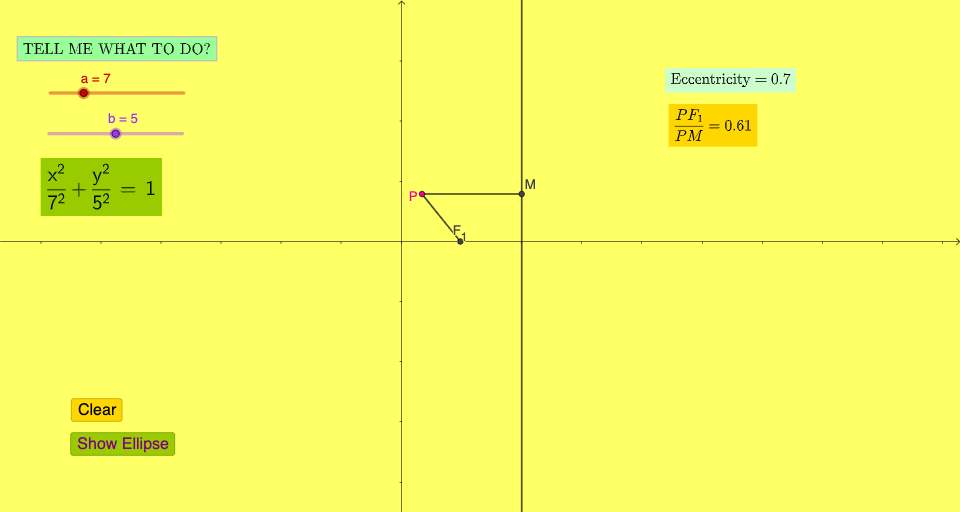
This example uses dynamic geometric construction and distance/length measurements to demonstrate an ellipse-related configuration, where orthogonality and intersection determine key points and constraints. It highlights the geometry behind ellipse-like definitions (distance-based constraint ideas), and how perpendicular constructions and intersection-driven construction stabilize the relationships. The construction is built with GeoGebra commands such as OrthogonalLine to create perpendicular lines (using foundational objects like a, b), Intersect to compute crucial intersection points (e.g., F1, P, M), and Segment together with Length to measure and display distances that serve as the core numerical checks (including objects like c, e, f, r, g, h and text readouts such as text1–text6 and reveal/controls). Suitable for middle school through early college learners, especially for geometry construction, conceptual validation, and interactive math demonstrations.
GeoGebra Commands & Parameters
OrthogonalLine(P, eq2) → fIntersect(f, eq2) → MSegment(P, M) → gSegment(P, F_{1}) → hLength(data) → n
AI Drawing Prompt Reference
Draw an ellipse by constructing perpendicular lines and finding intersection points. Start by constructing a line f perpendicular to a given line from point P. Then, find the intersection point M of f and the given line. Next, draw segments PM and PF1. Finally, measure the lengths of PM and PF1 and display them. This process demonstrates how to define an ellipse using perpendicular lines and intersection points.
The prompt above was compiled from the original drawing commands and is for reference only.