
Tracing an Ellipsoid with Ellipses via Intersections
Loading the math board and drawing, please wait…
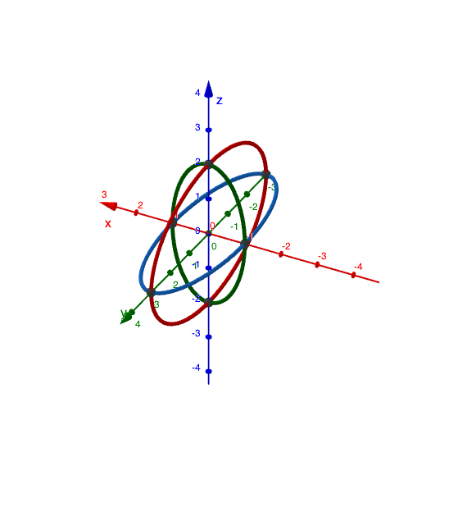
This GeoGebra example demonstrates how to take a family of plane cross-sections of an ellipsoid and obtain the corresponding ellipses, thereby tracing and visualizing how the sectional geometry evolves inside a 3D solid. The key math ideas are the geometry of quadratic surfaces (ellipsoids), the relationship between ellipses and quadratic equations as cross-sections, and construction logic based on intersection points under geometric constraints. The build relies on GeoGebra commands such as Intersect and IntersectPath to compute intersection points/paths, using constructed objects (e.g., i, j, k, a, p, c, q, d, r, e, A, B, C, D, E, F) and interactive controls (button1, button2, plus text1) to guide the tracing workflow. It is well-suited for advanced high-school learners and introductory university students in solid/analytic geometry, especially for lessons on conics, quadratic equations, and 3D visualization through intersections.
GeoGebra Commands & Parameters
IntersectPath(p, a) → cIntersectPath(q, eq1) → dIntersectPath(r, eq2) → eIntersect(d, e) → A, B, ,Intersect(c, e) → C, D, ,Intersect(d, c) → E, F, ,
AI Drawing Prompt Reference
Draw an ellipsoid and show the ellipses obtained from its various cross-sections. Key objects include the ellipsoid itself, multiple ellipse sections, and their intersection points. The construction order starts with the ellipsoid, defines cross-section planes, calculates intersection points between sections and the ellipsoid, and then determines intersection points to form the complete figure.
The prompt above was compiled from the original drawing commands and is for reference only.