
Geometric Construction of the Steiner Point (Tangents & Angle Bisectors)
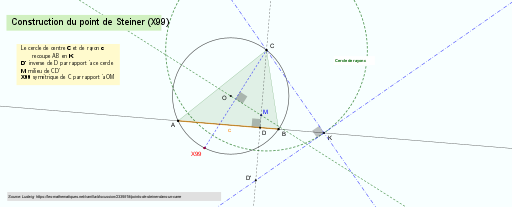
Loading the math board and drawing, please wait…
In collections
Besondere Punkte/Special Points
This example demonstrates how to construct the Steiner point associated with a given triangle and visually verifies its geometric relationships through tangent-like constraints and angle bisector structure. The key math concepts include special triangle points (via TriangleCenter), angle bisectors and symmetry reasoning (LineBisector, Mirror), circle–line intersection and segment relations (Circle, Intersect, Segment), orthogonal constructions (OrthogonalLine), and midpoint-based setup (Midpoint). Construction highlights: Line connects critical points, OrthogonalLine builds perpendiculars, and Intersect is used to locate intersection points between lines and circles (or lines). A Circle provides the auxiliary loci. Midpoint and Mirror are used to implement symmetric placements and related constraints, while LineBisector determines the angle-splitting directions that guide the target point. The model uses triangle vertices and auxiliary objects (e.g., A, B, C, and additional lines/circles/points) to compute and check the Steiner-related point. Suitable for upper-secondary geometry, competition-oriented construction problems, and instructional demonstrations of classical Euclidean construction techniques.
GeoGebra Commands & Parameters
Line(A, B) → fOrthogonalLine(C, f) → gIntersect(f, g) → DSegment(A, B) → cCircle(C, c) → dMirror(D, d) → D'Midpoint(C, D') → MCircle(A, B, C) → hLineBisector(A, B) → iLineBisector(B, C) → jIntersect(i, j) → OLine(M, O) → kMirror(C, k) → X99Polygon(A, B, C) → t1, c_1, a, bTriangleCenter(A, B, C, 99) → FIntersect(d, f, 2) → KLine(C, K) → lOrthogonalLine(K, l) → mAngle(C, K, D') → αAngle(C, D, A) → βSegment(X99, C) → nIntersect(k, n) → EAngle(M, E, C) → γOrthogonalLine(C, g) → pIntersect(d, p, 1) → H
AI Drawing Prompt Reference
Draw a triangle and drop a perpendicular from one vertex to the opposite side, marking the foot. Use this foot as the center and one triangle side as radius to draw a circle. Reflect the foot across this circle to get a new point, then take the midpoint between this reflected point and the original vertex. Construct the perpendicular bisectors of two triangle sides to find their intersection (the circumcenter), and connect this center to the midpoint with a line. Reflect the third vertex across this line to obtain the target point. Draw the circumcircle of the trianglehol, find the intersection of the perpendicular with this circle, and connect that point to the third vertex, then draw a perpendicular to this connection. Finally, show the triangle, relevant angle marks, and the segment from the target point to the third vertex to verify the geometric relations.
The prompt above was compiled from the original drawing commands and is for reference only.