
Task 6: Constructing Circles and Sectors with Angle-Driven Measures
Loading the math board and drawing, please wait…
In collections
Arc Length & Sector Area EXPLORATION
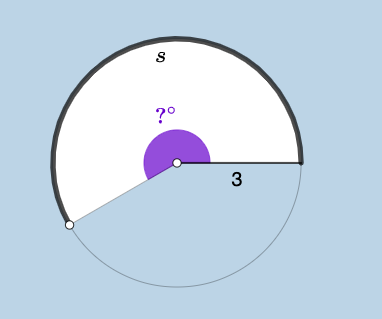
This example demonstrates how to build circles, circular arcs, and circular sectors using a parameterized construction, and how angular quantities and user inputs can be linked to geometric measurements. The key mathematical ideas include circle geometry (arc/sector definition), measuring angles to determine a sector’s region, and expressing or visualizing related quantities through functions and numeric displays (e.g., a workflow that can support logarithmic-function views, confidence-interval style uncertainty visualization, or correlation-related interpretations). Construction highlights extracted from the summary: the model uses GeoGebra commands Point, Ray, Circle, Segment, Rotate, Angle, CircleArc, CircleSector, Textfield, Area, Circumference, and FractionText. The scene includes structured geometric objects (points such as A, B and parameters like h, c, α, d, g, etc.), interactive inputs via InputBox1 and InputBox2, and multiple labels (text1–text10) to present computed measures like area and circumference. Suitable for middle/high school students learning geometric construction with dynamic parameters, and for GeoGebra-based inquiry or STEM modeling lessons.
GeoGebra Commands & Parameters
Point(yAxis) → ARay(A, (1, 0)) → hPoint(h) → BCircle(A, B) → cSegment(A, B) → fRotate(B, (a * pi / 180), A) → B'Angle(B, A, B') → αCircleArc(A, B, B') → dSegment(A, B') → gCircleSector(A, B, B') → eTextfield(a) → InputBox1Area(c) → lCircumference(c) → mTextfield(n) → InputBox2FractionText(a / 360) → text8
AI Drawing Prompt Reference
Draw a circle with its center at the origin, pick a point on the circle and connect it to the center to form a radius. Rotate this point around the center by a specified angle to create another point, then draw the circular arc and sector between the two radius lines. Display the circle's area and circumference as numerical values, and show the angle as a fraction of 360 degrees. The entire figure should update dynamically when the angle parameter is changed.
The prompt above was compiled from the original drawing commands and is for reference only.