
Polyline Approximation of the Intersection of Two Curves (Scripted Construction)
Loading the math board and drawing, please wait…
In collections
intersection: surface-surface, curve-curve
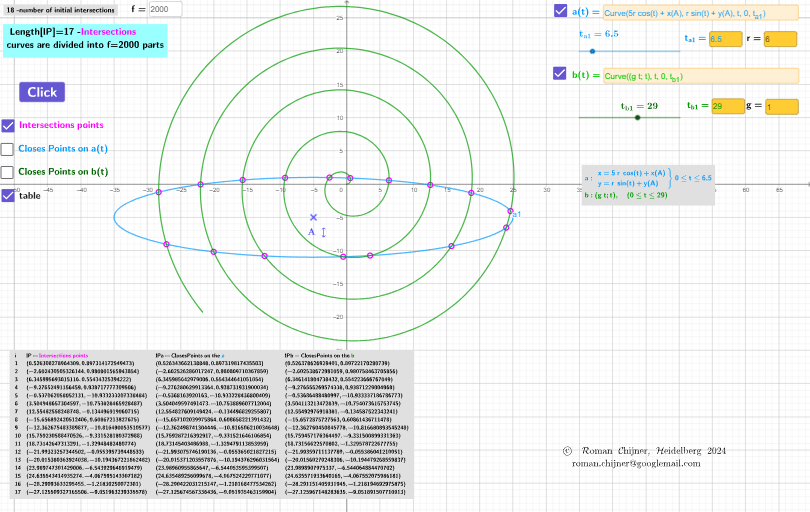
This GeoGebra example demonstrates how to compute and visualize the intersection set between Curve 1 and Curve 2, then approximate the resulting intersection curve using a polyline constructed from discrete samples. The key mathematical ideas include geometric intersection, parameter-driven construction (using a parameter such as t to scan solution ranges), and numerical/graphical approximation via polyline sampling. The construction highlights how to drive the workflow with GeoGebra’s scripting and interactive controls: CurveCartesian is used to generate Cartesian curves, Textfield together with LaTeX is employed for formula-rich labels and annotations, and TableText is used to display parameter values or intermediate results. The construct also relies on parameter objects and inputs (e.g., InputBox1–InputBox6) and buttons (button1, button2) to control iteration bounds and sampling density (variables like n1/n2 or lP-style polyline outputs), while additional text objects (text1, text2, text4a, text5) present computed quantities clearly. Suitable for high school through undergraduate topics such as coordinate geometry, computational visualization, and numerical approximation of intersections.
GeoGebra Commands & Parameters
CurveCartesian(((5 * r) * cos(t)) + x(A), (r * sin(t)) + y(A), t, 0, t_{a1}) → a1CurveCartesian(((g * t); t), t, 0, t_{b1}) → b1Textfield(h) → InputBox1Textfield(a1) → InputBox2Textfield(b1) → InputBox3Textfield(g) → InputBox4Textfield(r) → InputBox5Textfield(f) → InputBox6LaTeX(a1, false, false) → txtaLaTeX(b1, false, false) → txtbTableText(Append["i", 1…Length[lP]], Append["lP- \fgcolor{magenta}{Intersections\;points}", lP], Append["lPa-ClosesPoints \;on\; the\; \fgcolor{#0099FF}{a} ", lPa1], Append["lPb-ClosesPoints \;on\; the\;\fgcolor{#009900}{b}", lPb1], "v") → text5Textfield(t_{a1}) → InputBox7Textfield(t_{b1}) → InputBox8
AI Drawing Prompt Reference
Draw the intersection set of two curves and approximate it with a polyline. The construction includes two parametric curves, a polyline approximation, intersection information display, and parameter input boxes. Steps: first define parameters such as t, r, g; then generate the two curves; compute their intersection points; finally approximate the intersection curve with a polyline and label the number of intersection points and parameter values.
The prompt above was compiled from the original drawing commands and is for reference only.