
Sets and LCM of Two Numbers via Prime Factors and GCD
Loading the math board and drawing, please wait…
In collections
Sets
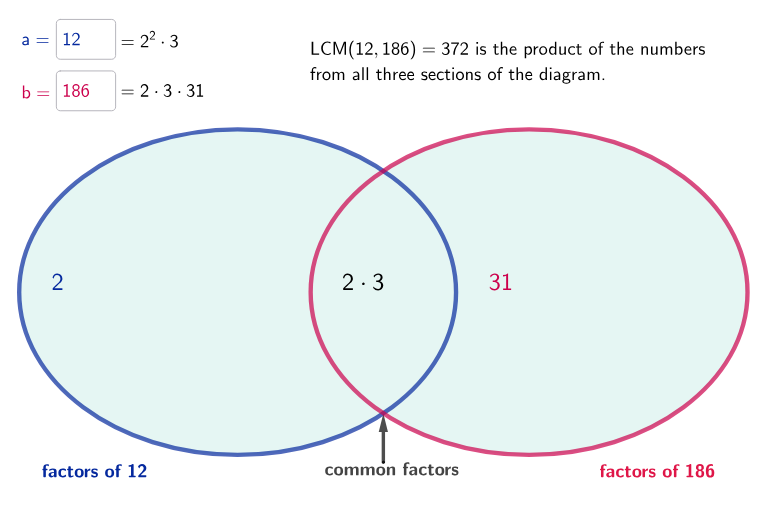
This GeoGebra example demonstrates how to visualize number-theoretic information for two integers a and b by translating prime-factor data into set-based operations, leading to the computation and interpretation of the GCD and the LCM. The key mathematical ideas are integers, GCD (mcdAB) and LCM (LCM), prime factorization (PrimeFactors), factor multiplicities via Frequency, and set concepts such as Unique factors, intersection/union-style decomposition into “only-a”, “only-b”, and “common” parts. Construction-wise, it uses commands and objects such as GCD to obtain mcdAB, PrimeFactors to produce aFact and bFact, Frequency to compute exponent-related data, and Unique to obtain onlyaFact and onlybFact. It then builds structured sequences using Vector and Sequence, zips/combines them with Zip to form lists like uniMcd, uniOnlya, uniOnlyb and exponent-encoded forms (e.g., espmcdFact, espOnlyaFact, espOnlybFact). Text outputs (fullText…, finalText…) present intermediate and final LCM-related results, while geometric objects like Point, Ellipse, and Intersection help arrange the interactive display. Suitable for upper secondary to early undergraduate math lessons, especially for number theory, algebra, and interactive conceptual learning.
GeoGebra Commands & Parameters
GCD(a, b) → mcdABTextfield(a) → InputBox1Textfield(b) → InputBox2Point(xAxis) → APoint(xAxis) → BEllipse(A, B, C) → dPoint(xAxis) → DPoint(xAxis) → EEllipse(D, E, F) → ePrimeFactors(a) → aFactPrimeFactors(b) → bFactFrequency(aFact) → espaFactFrequency(bFact) → espbFactUnique(aFact) → uniaUnique(bFact) → unibPrimeFactors(a / mcdAB) → onlyaFactPrimeFactors(b / mcdAB) → onlybFactPrimeFactors(mcdAB) → mcdFactFrequency(onlyaFact) → espOnlyaFactFrequency(onlybFact) → espOnlybFactFrequency(mcdFact) → espmcdFactUnique(onlyaFact) → uniOnlyaUnique(onlybFact) → uniOnlybUnique(mcdFact) → uniMcdVector(H, G) → uZip(Text[A], A, espaFact) → fullTextEspaZip(Text[A], A, espbFact) → fullTextEspbZip(Text[A], A, espOnlybFact) → fullTextEspOnlybZip(Text[A], A, espOnlyaFact) → fullTextEspOnlyaSequence(If[fullTextEspa(k) ≠ "1", fullTextEspa(k), ""], k, 1, Length[fullTextEspa]) → finalTextEspaSequence(If[fullTextEspb(k) ≠ "1", fullTextEspb(k), ""], k, 1, Length[fullTextEspb]) → finalTextEspbSequence(If[fullTextEspOnlyb(k) ≠ "1", fullTextEspOnlyb(k), ""], k, 1, Length[fullTextEspOnlyb]) → finalTextEspOnlybSequence(If[fullTextEspOnlya(k) ≠ "1", fullTextEspOnlya(k), ""], k, 1, Length[fullTextEspOnlya]) → finalTextEspOnlyaZip(Text[A], A, espmcdFact) → fullTextEspmcdSequence(If[fullTextEspmcd(k) ≠ "1", fullTextEspmcd(k), ""], k, 1, Length[fullTextEspmcd]) → finalTextEspmcdLCM(a, b) → mcmAB
AI Drawing Prompt Reference
The graphic displays the prime factorization and set decomposition of two integers a and b. Points A and B represent a and b, with ellipses and additional points D, E, F used for visualization. After computing GCD and LCM, a and b are decomposed into prime factor sets, and Unique and Frequency concepts extract 'only a', 'only b', and 'common' parts. Text boxes show intermediate and final LCM results, organized into structured lists via sequences and vectors. The layout is clear and interactive, suitable for teaching number theory.
The prompt above was compiled from the original drawing commands and is for reference only.