
Slanted or Curved Lines? Exploring Visual Differences with Sequences
Loading the math board and drawing, please wait…
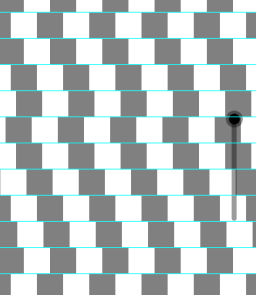
This GeoGebra example demonstrates the visual and mathematical distinction between slanted straight lines and genuinely curved lines through dynamic construction. It involves core concepts from geometry (lines, slopes, intersections), trigonometry (cosine), and calculus (differential equations), while leveraging the Sequence command to generate multiple objects (l1, l2, m1 through m11) that transition from linear to curved forms. The construction uses sequence-based generation of segments or loci, incorporates cosine functions and differential equations to define curves, and highlights differences via slope comparisons and intersection points. Suitable for high school or early college students, this interactive tool helps clarify the fundamental nature of straight versus curved lines, supports teaching of derivatives and differential equations in calculus, and serves as a visual aid for geometry and function graphing lessons.
GeoGebra Commands & Parameters
Sequence(y = i, i, -10, 10, 1) → l1Sequence(Polygon[(i, -10), (i + 1, -10), 4], i, -10, 9, 2) → l2Sequence(Translate[l2, (0, i)], i, 1, 19, 1) → m1Sequence(Translate[Element[m1, (10 * i) - 1], Vector[((2.5 * a), 0)]], i, 1, 2, 1) → m2Sequence(Translate[Element[m1, (10 * i) - 3], Vector[((-1.5 * a), 0)]], i, 1, 2, 1) → m3Sequence(Translate[Element[m1, (10 * i) - 2], Vector[((0 * a), 0)]], i, 1, 2, 1) → m4Sequence(Translate[Element[m1, (10 * i) - 4], Vector[((-a), 0)]], i, 1, 2, 1) → m5Sequence(Translate[Element[m1, (10 * i) - 5], Vector[((-0.8 * a), 0)]], i, 1, 2, 1) → m6Sequence(Translate[Element[m1, (10 * i) - 6], Vector[((0.8 * a), 0)]], i, 1, 2, 1) → m7Sequence(Translate[Element[m1, (10 * i) - 7], Vector[((1.2 * a), 0)]], i, 1, 2, 1) → m8Sequence(Translate[Element[m1, (10 * i) - 8], Vector[((-0.4 * a), 0)]], i, 1, 2, 1) → m9Sequence(Translate[Element[m1, (10 * i) - 9], Vector[((0 * a), 0)]], i, 1, 2, 1) → m10Sequence(Translate[Element[m1, (10 * i) - 10], Vector[((0.25 * a), 0)]], i, 1, 2, 1) → m11
AI Drawing Prompt Reference
Draw a set of vertical parallel lines as a baseline, then create multiple horizontal line segments arranged in layers, apply varying horizontal translations to these segments so that the originally straight layered lines gradually appear to form curved shapes, visually demonstrating the difference between slanted straight lines and genuinely curved lines through direct comparison.
The prompt above was compiled from the original drawing commands and is for reference only.