
Sequence Investigation #3: Stepwise Construction and Cumulative Sums
Loading the math board and drawing, please wait…
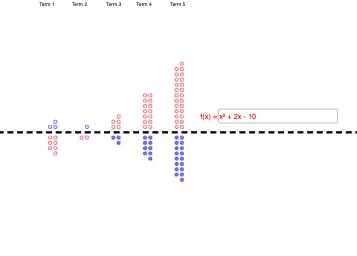
This example demonstrates how to explore a sequence through geometric construction and a step-by-step rule, where each iteration’s cumulative result (partial sums S1 to S10) is visualized on the diagram. The key math ideas include functions with input parameters, sequences (including recursive/iterative behavior), and the interpretation of partial sums as a progressively evolving geometric quantity. Construction highlights: using GeoGebra commands Line, If, and Textfield; creating base geometry with objects such as a, b, c, A, B, and a horizontalLine; introducing a parameter s and generating S_1, S_2, …, S_10 as the cumulative objects; applying If to enforce piecewise conditions or the iteration logic; and using Textfield together with text labels (text1…text6, plus additional text2…text6-style annotations) to dynamically display parameters and intermediate results. A function f is incorporated along with an InputBox1 and computed/related objects F_1…F_10 to support the numerical/functional side of each step. Suitable for upper-secondary and early university users for sequence modeling and geometry–function connections.
GeoGebra Commands & Parameters
Line(A, B) → horizontalLineIf(s(1) ≥ 0, Sequence[Circle[(Mod[n, 2], floor(n / 2 + 0.5)), 0.3], n, 1, s(1)]) → S_1If(s(1) < 0, Sequence[Circle[(Mod[abs(n), 2], (-floor(abs(n) / 2 + 0.5))), 0.3], n, -1, s(1), -1]) → S_2If(s(2) ≥ 0, Sequence[Circle[(Mod[n, 2] + 6, floor(n / 2 + 0.5)), 0.3], n, 1, s(2)]) → S_3If(s(3) ≥ 0, Sequence[Circle[(Mod[n, 2] + 12, floor(n / 2 + 0.5)), 0.3], n, 1, s(3)]) → S_4If(s(4) ≥ 0, Sequence[Circle[(Mod[n, 2] + 18, floor(n / 2 + 0.5)), 0.3], n, 1, s(4)]) → S_5If(s(5) ≥ 0, Sequence[Circle[(Mod[n, 2] + 24, floor(n / 2 + 0.5)), 0.3], n, 1, s(5)]) → S_6If(s(2) < 0, Sequence[Circle[(Mod[abs(n), 2] + 6, (-floor(abs(n) / 2 + 0.5))), 0.3], n, -1, s(2), -1]) → S_7If(s(3) < 0, Sequence[Circle[(Mod[abs(n), 2] + 12, (-floor(abs(n) / 2 + 0.5))), 0.3], n, -1, s(3), -1]) → S_8If(s(4) < 0, Sequence[Circle[(Mod[abs(n), 2] + 18, (-floor(abs(n) / 2 + 0.5))), 0.3], n, -1, s(4), -1]) → S_9If(s(5) < 0, Sequence[Circle[(Mod[abs(n), 2] + 24, (-floor(abs(n) / 2 + 0.5))), 0.3], n, -1, s(5), -1]) → S_{10}Textfield(f) → InputBox1If(f(1) ≥ 0, Sequence[Circle[(Mod[n, 2], floor(n / 2 + 0.5)), 0.3], n, 1, f(1)]) → F_1If(f(1) < 0, Sequence[Circle[(Mod[abs(n), 2], (-floor(abs(n) / 2 + 0.5))), 0.3], n, -1, f(1), -1]) → F_2If(f(2) ≥ 0, Sequence[Circle[(Mod[n, 2] + 6, floor(n / 2 + 0.5)), 0.3], n, 1, f(2)]) → F_3If(f(3) ≥ 0, Sequence[Circle[(Mod[n, 2] + 12, floor(n / 2 + 0.5)), 0.3], n, 1, f(3)]) → F_4If(f(4) ≥ 0, Sequence[Circle[(Mod[n, 2] + 18, floor(n / 2 + 0.5)), 0.3], n, 1, f(4)]) → F_5If(f(5) ≥ 0, Sequence[Circle[(Mod[n, 2] + 24, floor(n / 2 + 0.5)), 0.3], n, 1, f(5)]) → F_6If(f(2) < 0, Sequence[Circle[(Mod[abs(n), 2] + 6, (-floor(abs(n) / 2 + 0.5))), 0.3], n, -1, f(2), -1]) → F_7If(f(3) < 0, Sequence[Circle[(Mod[abs(n), 2] + 12, (-floor(abs(n) / 2 + 0.5))), 0.3], n, -1, f(3), -1]) → F_8If(f(4) < 0, Sequence[Circle[(Mod[abs(n), 2] + 18, (-floor(abs(n) / 2 + 0.5))), 0.3], n, -1, f(4), -1]) → F_9If(f(5) < 0, Sequence[Circle[(Mod[abs(n), 2] + 24, (-floor(abs(n) / 2 + 0.5))), 0.3], n, -1, f(5), -1]) → F_{10}
AI Drawing Prompt Reference
Draw a horizontal line. Then, based on the value of parameter s, generate a series of circles with a radius of 0.3, where the center points of the circles move along the horizontal line. When s is positive, the center points move in the positive direction; when s is negative, they move in the negative direction. Similarly, use function f to generate a series of circles with the same movement logic. Finally, dynamically display the values of s and f and annotate their changes on the graph.
The prompt above was compiled from the original drawing commands and is for reference only.