
Sequence Investigation #2: Visualizing Evolution via Centroids
Loading the math board and drawing, please wait…
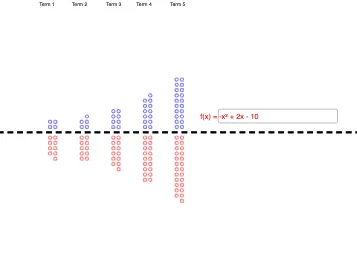
This example demonstrates how a sequence can be explored geometrically: it generates a set of points (optionally via random experiments or user input), plots them as a scatter plot, and then computes and displays the centroid/barycenter associated with the first n terms. By showing states labeled S_1 through S_10, learners can visually track how the running average (centroid) evolves as n increases. The core mathematical ideas are sequences (prefix construction), centroid/barycenter as an averaging concept for points/vectors, and the use of geometric connections and annotations to reason about sequence behavior. Construction in GeoGebra relies on commands such as Line for building guiding segments/lines, If for conditional logic in updating elements, and Textfield for interactive labels and displayed values. The objects include parameters a, b, c, multiple text fields (text1…text6), a common horizontal line reference, the sequence states S_1…S_10, and interactive inputs such as InputBox1 with values F_1…F_10 to control steps or function-like outputs. Suitable for advanced middle school through early university, especially for inquiry-based learning on sequence patterns using coordinate geometry and dynamic visualization.
GeoGebra Commands & Parameters
Line(A, B) → horizontalLineIf(s(1) ≥ 0, Sequence[Circle[(Mod[n, 2], floor(n / 2 + 0.5)), 0.3], n, 1, s(1)]) → S_1If(s(1) < 0, Sequence[Circle[(Mod[abs(n), 2], (-floor(abs(n) / 2 + 0.5))), 0.3], n, -1, s(1), -1]) → S_2If(s(2) ≥ 0, Sequence[Circle[(Mod[n, 2] + 6, floor(n / 2 + 0.5)), 0.3], n, 1, s(2)]) → S_3If(s(3) ≥ 0, Sequence[Circle[(Mod[n, 2] + 12, floor(n / 2 + 0.5)), 0.3], n, 1, s(3)]) → S_4If(s(4) ≥ 0, Sequence[Circle[(Mod[n, 2] + 18, floor(n / 2 + 0.5)), 0.3], n, 1, s(4)]) → S_5If(s(5) ≥ 0, Sequence[Circle[(Mod[n, 2] + 24, floor(n / 2 + 0.5)), 0.3], n, 1, s(5)]) → S_6If(s(2) < 0, Sequence[Circle[(Mod[abs(n), 2] + 6, (-floor(abs(n) / 2 + 0.5))), 0.3], n, -1, s(2), -1]) → S_7If(s(3) < 0, Sequence[Circle[(Mod[abs(n), 2] + 12, (-floor(abs(n) / 2 + 0.5))), 0.3], n, -1, s(3), -1]) → S_8If(s(4) < 0, Sequence[Circle[(Mod[abs(n), 2] + 18, (-floor(abs(n) / 2 + 0.5))), 0.3], n, -1, s(4), -1]) → S_9If(s(5) < 0, Sequence[Circle[(Mod[abs(n), 2] + 24, (-floor(abs(n) / 2 + 0.5))), 0.3], n, -1, s(5), -1]) → S_{10}Textfield(f) → InputBox1If(f(1) ≥ 0, Sequence[Circle[(Mod[n, 2], floor(n / 2 + 0.5)), 0.3], n, 1, f(1)]) → F_1If(f(1) < 0, Sequence[Circle[(Mod[abs(n), 2], (-floor(abs(n) / 2 + 0.5))), 0.3], n, -1, f(1), -1]) → F_2If(f(2) ≥ 0, Sequence[Circle[(Mod[n, 2] + 6, floor(n / 2 + 0.5)), 0.3], n, 1, f(2)]) → F_3If(f(3) ≥ 0, Sequence[Circle[(Mod[n, 2] + 12, floor(n / 2 + 0.5)), 0.3], n, 1, f(3)]) → F_4If(f(4) ≥ 0, Sequence[Circle[(Mod[n, 2] + 18, floor(n / 2 + 0.5)), 0.3], n, 1, f(4)]) → F_5If(f(5) ≥ 0, Sequence[Circle[(Mod[n, 2] + 24, floor(n / 2 + 0.5)), 0.3], n, 1, f(5)]) → F_6If(f(2) < 0, Sequence[Circle[(Mod[abs(n), 2] + 6, (-floor(abs(n) / 2 + 0.5))), 0.3], n, -1, f(2), -1]) → F_7If(f(3) < 0, Sequence[Circle[(Mod[abs(n), 2] + 12, (-floor(abs(n) / 2 + 0.5))), 0.3], n, -1, f(3), -1]) → F_8If(f(4) < 0, Sequence[Circle[(Mod[abs(n), 2] + 18, (-floor(abs(n) / 2 + 0.5))), 0.3], n, -1, f(4), -1]) → F_9If(f(5) < 0, Sequence[Circle[(Mod[abs(n), 2] + 24, (-floor(abs(n) / 2 + 0.5))), 0.3], n, -1, f(5), -1]) → F_{10}
AI Drawing Prompt Reference
Draw a coordinate plane with a horizontal reference line. Above and below this line, arrange five groups of small circles, each group shifted horizontally to create a stepped or zigzag pattern. The number of circles in each group is controlled by user input via text fields; positive inputs place circles above the line, negative inputs below. Circles are added sequentially according to natural number order, with state labels (such as S1 to S10) displayed. The overall graphic visualizes how the average position (centroid) of the first n terms of a sequence evolves as n increases, through the distribution of circles and movement of labels.
The prompt above was compiled from the original drawing commands and is for reference only.