
Flipping a Coin Simulation: Binomial Frequency Visualization
Loading the math board and drawing, please wait…
In collections
Statistics & Probability
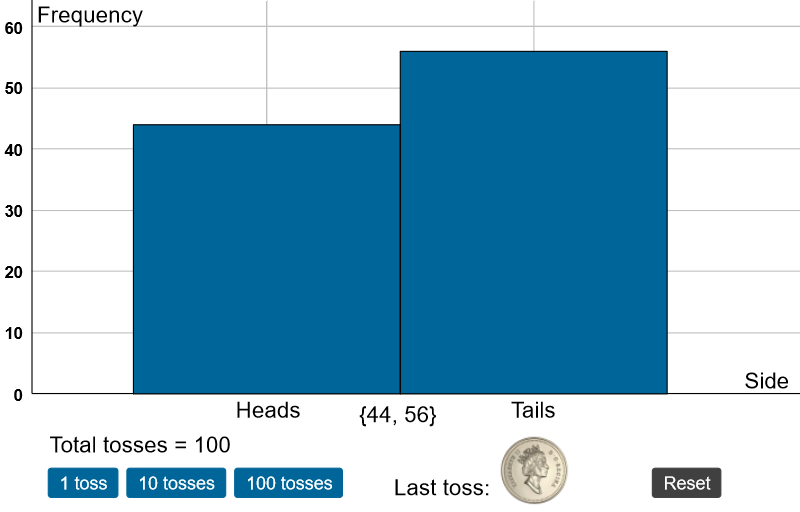
This example demonstrates how to simulate repeated tosses of a single coin in GeoGebra and visualize the resulting empirical frequencies. It highlights how the distribution of outcomes (heads vs. tails) evolves as the number of trials changes, using both a bar chart and a circle/pie-style frequency visualization. The core math concepts are probability and the binomial distribution (modeling the number of successes), together with discrete frequency counting and graphical representation. Construction-wise, Sequence is used to generate the rolling experiment (rolls), while If classifies each outcome (heads/tails) and updates counters such as die1, die2, and their totals (sum). Lists like die1list, die2list, and sumlist support aggregation across trials; frequencies computes category counts; BarChart renders the frequency distribution; labels and multiple text elements (text1, text2, text3, etc.) display key statistics; and graphical components (pic1, pic2, text overlays) complete the interactive visualization. Suitable for middle/high school probability lessons and classroom activities that connect theoretical binomial models with observed experimental frequencies.
GeoGebra Commands & Parameters
Sequence(Random[1, 6], k, 1, 100) → die2list, {1, 6, 1, 1, 4, 2, 2, 5, 4, 3, 6, 2, 2, 4, 2, 1, 6, 4, 4, 1, 6, 4, 1, 2, 3, 2, 2, 1, 6, 3, 3, 4, 1, 1, 1, 3, 2, 2, 6, 1, 5, 4, 5, 5, 6, 6, 6, 5, 5, 6, 1, 6, 4, 4, 2, 1, 5, 2, 5, 5, 2, 4, 1, 4, 4, 6, 1, 3, 5, 4, 5, 5, 5, 3, 1, 1, 4, 3, 6, 6, 4, 2, 5, 1, 1, 2, 2, 3, 6, 1, 3, 1, 2, 6, 2, 3, 2, 2, 4, 6}Sequence(Random[1, 2], k, 1, 100) → die1list, {1, 2, 2, 1, 2, 2, 2, 2, 1, 2, 2, 2, 2, 2, 1, 1, 1, 2, 1, 2, 1, 2, 2, 1, 2, 2, 2, 1, 1, 2, 1, 1, 1, 2, 1, 2, 2, 2, 2, 2, 1, 2, 2, 1, 2, 2, 1, 2, 1, 1, 1, 1, 2, 1, 1, 2, 2, 1, 2, 1, 2, 2, 1, 2, 1, 2, 2, 1, 1, 2, 2, 1, 2, 1, 1, 2, 1, 1, 1, 2, 1, 1, 1, 1, 1, 1, 2, 2, 1, 1, 2, 2, 2, 2, 2, 1, 1, 2, 1, 1}Sequence(CountIf[x ≟ k, rolls], k, 1, 2) → frequenciesBarChart(labels, frequencies) → aIf(Max[frequencies] < 10, 11, (Max[frequencies] * 1.15)) → maxSequence(sumlist(k), k, 91, 100) → last10, {2, 2, 2, 2, 2, 1, 1, 2, 1, 1}BarChart(labels, frequencies) → b
AI Drawing Prompt Reference
Simulate a coin flip experiment to visualize the frequency distribution of heads and tails over 100 trials. Use a bar chart and pie chart to display the results, with the bar chart based on frequency data and the pie chart showing the proportion of each outcome. Observe how the distribution changes as the number of trials increases. Include a slider to control the number of trials, dynamically updating the charts and statistics, with text labels showing key information like the maximum frequency and total trials.
The prompt above was compiled from the original drawing commands and is for reference only.