
Geometric Construction of Vector Components
Loading the math board and drawing, please wait…
In collections
Vectors
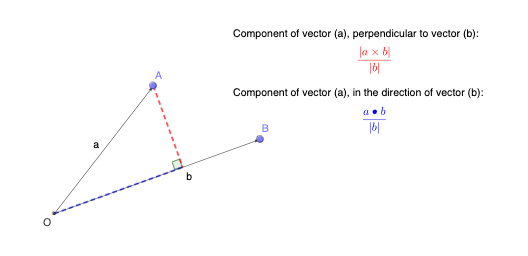
This example demonstrates how a vector can be decomposed into geometric components by building the required orthogonal relationships and marking the corresponding angles and segments. It highlights the connection between vector components and right-angle geometry, making the decomposition visually concrete. The main mathematical concepts are vectors, orthogonality (perpendicular lines), and component/projection-style reasoning, supported by angle measurement. Construction uses the commands listed in the summary: Intersect to locate key intersection points (e.g., the projection foot or derived vertices), Vector to create the vector objects (such as a, b, f, g), OrthogonalLine to draw perpendicular helper lines that define the components, Segment to display component line segments, and Angle to annotate the relevant inclinations. The scene also includes labeled objects (e.g., O, A, B, D and α) and text labels for explanation. Suitable for secondary school math and introductory coordinate geometry/vector instruction, as well as classroom demonstrations connecting vector decomposition to geometric interpretation.
GeoGebra Commands & Parameters
Intersect(xAxis, yAxis) → OVector(O, A) → aVector(O, B) → bOrthogonalLine(A, b) → fSegment(O, B) → gIntersect(f, g) → DAngle(A, D, O) → αSegment(A, D) → hSegment(O, D) → i
AI Drawing Prompt Reference
Draw a geometric construction showing vector decomposition. Start by drawing a vector from the origin to point A and another from the origin to point B. Draw a perpendicular line from point A to vector B, intersecting the line from the origin to B at point D. Connect the origin to D and A to D to represent the components. Label the origin, point D, and angle α to illustrate the relationship between vector decomposition and right-angle geometry.
The prompt above was compiled from the original drawing commands and is for reference only.