
Interpreting a Cumulative Frequency Polygon for Grouped Data
Loading the math board and drawing, please wait…
In collections
Statistics & Probability
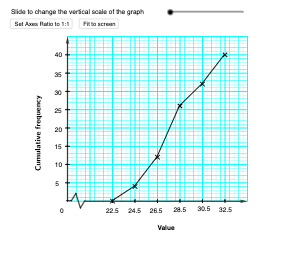
This example demonstrates how to construct and interpret a cumulative frequency polygon from grouped (binned) data. By connecting the cumulative frequency values at class boundaries, the diagram reveals how the distribution accumulates across intervals and supports intuitive reading of where observations concentrate. Key concepts include grouped frequency, cumulative frequency, and the graphical representation of cumulative change through a polygonal line. Construction uses GeoGebra commands such as Sequence to generate class-boundary and cumulative-frequency lists, Point to create key points, Segment and PolyLine to connect successive cumulative points, and If to handle conditional placement within valid class ranges. Additional objects like Vector and Corner help define directions and corner points for layout, while Textfield labels important quantities and scaling controls (e.g., xlscale/xsscale and y-interval scales) ensure the cumulative frequency graph is readable. Suitable for middle to high school statistics lessons, classroom demonstrations, and introductory data-analysis instruction.
GeoGebra Commands & Parameters
Sequence(Segment[(xlower, i), (xupper, i)], i, ylower, yupper, ysscale) → yminorSequence(Segment[(xlower, i), (xupper, i)], i, ylower, yupper, ylscale) → ymajorSequence(Segment[(i, ylower), (i, yupper)], i, xlower, xupper, xsscale) → xminorSegment(O, (x(O) + xsscale, y(O))) → sec1Segment((x(O) + xsscale, y(O)), (x(O) + (2 * xsscale), y(O) + (2 * ysscale))) → sec2Segment((x(O) + (2 * xsscale), y(O) + (2 * ysscale)), (x(O) + (3 * xsscale), y(O) + (-2 * ysscale))) → sec3Segment((x(O) + (3 * xsscale), y(O) - (2 * ysscale)), (x(O) + (4 * xsscale), y(O))) → sec4Vector(O, Y_e) → yaxiVector(X_0, X_e) → xaxiCorner(2, 1) → ZSequence((lowerclasslimit + ((i - 1) * classwidth), cfreq(i)), i, 1, n) → cfscatterPolyLine(cfscatter) → cfplotPoint(Segment[(lowerclasslimit, ylower), (lowerclasslimit + ((n - 1) * classwidth), ylower)]) → QPolyLine(Q, (x(Q), y(Q_1)), Q_1) → qSequence(Segment[(x(O) - xsscale / 2, (i * ylscale)), (x(O) + xsscale / 2, (i * ylscale))], i, 1, Div[yupper, ylscale] - 1) → yintSequence(Segment[(x(C) + (4 * i), y(C)), (x(C) + (4 * i), y(C) - (n + 1))], i, 0, 2) → T2Sequence(Segment[(x(C), y(C) - i), (x(C) + 8, y(C) - i)], i, 0, n + 1) → T1Textfield(lowerclasslimit) → InputBox1Textfield(upperclasslimit) → InputBox2Textfield(cf2) → InputBox4Textfield(cf3) → InputBox5Textfield(cf4) → InputBox6Textfield(cf5) → InputBox7Textfield(cf6) → InputBox8Textfield(cf7) → InputBox9Textfield(cf8) → InputBox10Sequence(Segment[(lowerclasslimit + (i * classwidth), ylower + ysscale / 2), (lowerclasslimit + (i * classwidth), ylower - ysscale / 2)], i, 0, n - 1) → xintPolyLine(R, (x(R), y(R_1)), R_1) → rPoint(Segment[Q, (lowerclasslimit + ((n - 1) * classwidth), ylower)]) → EPolyLine(E, (x(E), y(E_1)), E_1) → eSequence(Segment[(i, ylower), (i, yupper)], i, xlower, xupper, xlscale) → xmajorIf(chi ≟ false, RotateText["Cumulative frequency", 90°], RotateText["累積頻數", 90°]) → text4
AI Drawing Prompt Reference
Draw a cumulative frequency polygon. First, determine the class boundaries and cumulative frequency values from grouped data. Then, mark points at each class boundary with their corresponding cumulative frequencies. Finally, connect these points in order to form a polygonal line. This visual representation helps illustrate how data accumulates across intervals.
The prompt above was compiled from the original drawing commands and is for reference only.