
Building a Cumulative Frequency Graph
Loading the math board and drawing, please wait…
In collections
Statistics & Probability
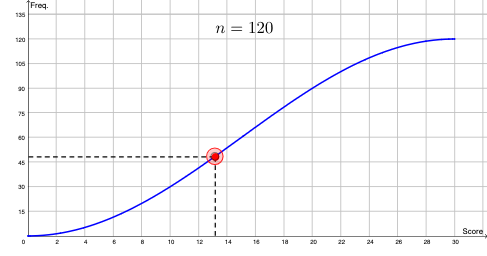
This GeoGebra example demonstrates how to construct a cumulative frequency graph from discrete data points, highlighting how the curve reflects the overall distribution as frequency accumulates. It focuses on key ideas from probability & statistics such as cumulative frequency (and cumulative distribution interpretation), mapping statistical quantities onto a graph, and using scatter/connected segments to visualize the cumulative trend. The construction uses GeoGebra commands Point and Segment to create and link key points and interval endpoints; the involved objects include k, f, g, A, B, C, a, b, n, and text1 to parameterize points/indices and annotate the graph. Suitable for middle and high school learners, introductory data analysis lessons, and classroom demonstrations of how to move from a frequency table to a cumulative frequency plot.
GeoGebra Commands & Parameters
Point(g) → ASegment(B, A) → aSegment(A, C) → b
AI Drawing Prompt Reference
Draw a cumulative frequency graph starting from the lower left, connecting data points in sequence to form an ascending line that reflects the cumulative distribution. Include several key points connected by line segments in order, showing the trend of frequency accumulating as the data values increase, presenting a stepwise rising pattern from left to right.
The prompt above was compiled from the original drawing commands and is for reference only.