
Geometric Distribution Probability Calculator: Sequence and Histogram View
Loading the math board and drawing, please wait…
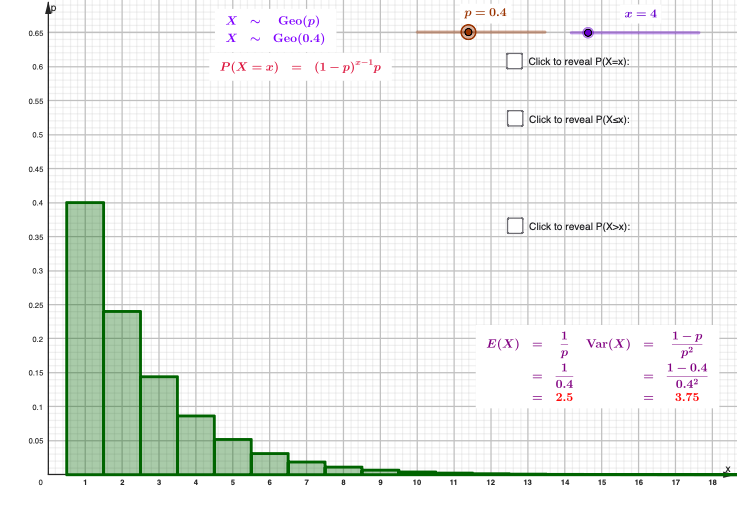
This example demonstrates how to compute and visualize the geometric distribution by generating a discrete probability sequence and displaying it with a histogram/bar-style graphic. It highlights the phenomenon that the probability of the first success occurring on trial k follows P(X=k)=(1−p)^(k−1)·p, and shows how the distribution changes as k increases for a given success probability p. The key math concepts are discrete random variables, probability mass functions, and constructing probability terms programmatically via a parameterized sequence. In GeoGebra, the construction primarily uses the Histogram and Sequence commands, along with a probability parameter p and multiple generated sequence terms (A1…A25, B1…B15) that feed the plotted histogram. Suitable for late secondary school through introductory university coursework, especially for lessons on probability & statistics and learning to build distribution visualizations in GeoGebra.
GeoGebra Commands & Parameters
Histogram(l1, l2) → aHistogram(l3, {pdf}) → dSequence(0.5 + n - 1, n, 1, b + 1) → l4, {0.5, 1.5, 2.5, 3.5, 4.5}Sequence(l2(n), n, 1, b) → l5, {0.4, 0.24, 0.144, 0.0864}Histogram(l4, l5) → gSequence(b + 0.5 + n - 1, n, 1, 24 - b + 1) → l6, {4.5, 5.5, 6.5, 7.5, 8.5, 9.5, 10.5, 11.5, 12.5, 13.5, 14.5, 15.5, 16.5, 17.5, 18.5, 19.5, 20.5, 21.5, 22.5, 23.5, 24.5}Sequence(l2(n), n, c, 24) → l7, {0.05184, 0.031104, 0.0186624, 0.01119744, 0.0067184639999999995, 0.0040310784, 0.0024186470399999997, 0.001451188224, 0.0008707129343999998, 0.0005224277606399999, 0.00031345665638399993, 0.00018807399383039997, 0.00011284439629823996, 0.00006770663777894397, 0.00004062398266736639, 0.00002437438960041983, 0.0000146246337602519, 0.000008774780256151138, 0.000005264868153690683, 0.00000315892089221441}Histogram(l6, l7) → i
AI Drawing Prompt Reference
Create a coordinate-plane visualization showing discrete geometric distribution probability mass functions as bar/histogram-style columns. Use trial number k on the horizontal axis and probability P(X=k) on the vertical axis, starting from k = 1. First compute and display a set of discrete probabilities corresponding to a success probability p = 0.5 as a bar chart over the first few k values. Then compute another set corresponding to p = 0.4 and overlay its bar chart for the next group of k values. Finally include an additional bar segment for further k values (still using p = 0.4) so the overall figure clearly shows how probabilities drop rapidly as k increases, with each bar aligned to its k position.
The prompt above was compiled from the original drawing commands and is for reference only.