
Poisson & Inverse Poisson Probability Calculator
Loading the math board and drawing, please wait…
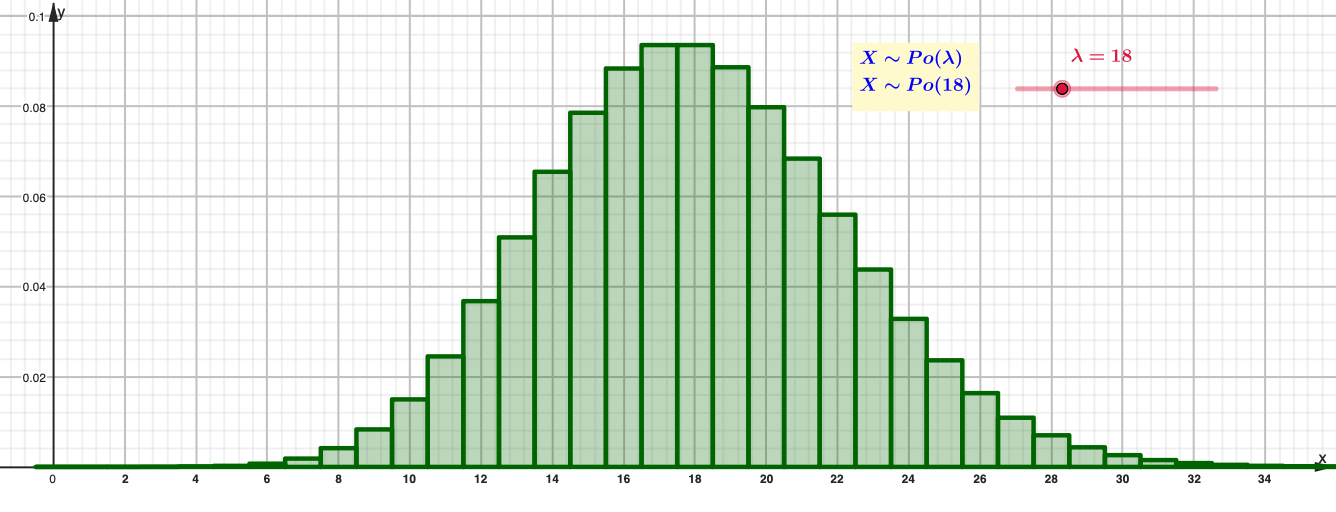
This example demonstrates how the Poisson distribution assigns probabilities to discrete counts for a chosen rate parameter λ, visualized using a histogram/bar chart. It also showcases the inverse Poisson task: given a target cumulative probability level, it computes the corresponding quantile/threshold value. The main mathematical concepts are the Poisson probability mass function, the distribution/cumulative probability idea for discrete random variables, and solving the inverse probability problem (finding the smallest k or the matching integer outcome that satisfies a probability condition). Construction-wise, it uses GeoGebra commands Poisson to generate the probability values, BarChart to display them as a bar chart, and InversePoisson to compute the inverse result; multiple text objects are used to label λ, probability inputs, and computed outputs. Suitable for high school advanced classes and introductory college probability & statistics, especially for visualization-based learning and interactive exploration with parameter changes.
GeoGebra Commands & Parameters
Poisson(λ, false) → aBarChart(0 - 0.5, d + 0.5, Sequence[(ℯ^((-λ)) * λ^(r) / r!), r, 0, d]) → eBarChart(d - 0.5, g + 0.5, Sequence[(ℯ^((-λ)) * λ^(r) / r!), r, d, g]) → hBarChart(g - 0.5, 160 + 0.5, Sequence[(ℯ^((-λ)) * λ^(r) / r!), r, g, 160]) → jInversePoisson(λ, n) → qBarChart(0 - 0.5, q + 0.5, Sequence[(ℯ^((-λ)) * λ^(r) / r!), r, 0, q]) → rInversePoisson(λ, 1 - p) → sBarChart(s - 0.5, 160 + 0.5, Sequence[(ℯ^((-λ)) * λ^(r) / r!), r, s, 160]) → t
AI Drawing Prompt Reference
Create a bar chart of the Poisson probability mass function with counts on the x-axis from 0 to 160 and probabilities on the y-axis. Use a slider to adjust the rate parameter λ and an input box for a target cumulative probability. Color the bars in three segments: from 0 to a lower bound, from that bound to an upper bound, and from the upper bound to 160, representing left, middle, and right cumulative regions. Based on the input probability, compute the corresponding quantile using the inverse Poisson and highlight that position with a vertical line or distinct bar color, plus a tail region from that quantile to 160. All bar heights follow the Poisson formula and update dynamically with λ.
The prompt above was compiled from the original drawing commands and is for reference only.