
Stem-and-Leaf Box Plots: Outliers and Standard Deviation View
Loading the math board and drawing, please wait…
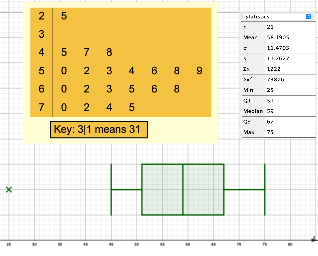
This example demonstrates how to visualize a data set’s distribution by combining a stem-and-leaf plot with a box plot, with emphasis on identifying outliers and relating the spread to standard deviation–type dispersion. The key statistical ideas include the stem-and-leaf representation (organizing data into stems and leaves), the five-number summary via box plots (Q1, median, Q3), outlier detection using the interquartile range (IQR) thresholds, and an interpretation of overall variability (dispersive behavior that connects to standard deviation). Construction-wise, the data are ordered and quartiles Q1/Q2/Q3 are computed, then GeoGebra’s BoxPlot is used to draw the box and whiskers, while StemPlot provides the stem-and-leaf structure. The build also computes and labels lower/upper outlier bounds (LV/UV) and uses text/annotation objects (e.g., text1 and various labeled components) to clearly mark the results on the same workspace. The construction summary indicates the core commands and objects: BoxPlot, StemPlot, Q1, Q3, Median, along with supporting variables/objects such as Q_1, Q_2, Q_3, LV, UV, and data/label holders (A1–A21, l1, a, b, etc.). Suitable for high-school statistics lessons, classroom demonstrations, and exploratory learning when comparing how the same dataset looks under different distribution visualizations.
GeoGebra Commands & Parameters
BoxPlot(2, 1, l1) → aStemPlot(l1) → text1Q1(l1) → Q_1Q3(l1) → Q_3Median(l1) → Q_2BoxPlot(1, 0.5, LV, Q_1, Q_2, Q_3, UV) → b
AI Drawing Prompt Reference
Create a combined visualization of the same dataset showing a stem-and-leaf plot alongside box plots. First draw a box plot that reflects the quartile structure, including the median and the quartiles. Next generate the corresponding stem-and-leaf plot to organize the data into stems and leaves. From this stem-and-leaf representation, compute and display Q1, Q3, and the median, and label these key statistics on the workspace. Finally, draw a second box plot that includes lower/upper outlier bounds together with the quartile points, so that outlier regions can be identified visually, keeping all annotations in the same view.
The prompt above was compiled from the original drawing commands and is for reference only.