
Geometric Interpretation of a Cumulative Frequency Polygon in GeoGebra
Loading the math board and drawing, please wait…
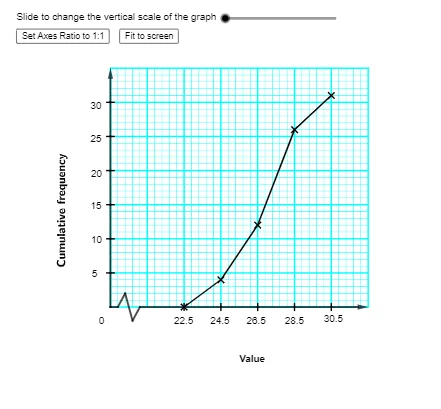
This example demonstrates how to construct and interpret a cumulative frequency polygon (累积频数多边形) from grouped data by visualizing the cumulative trend across class intervals. It focuses on frequency vs. cumulative frequency, class boundaries (lower/upper class limits), class width, and the rule that cumulative frequencies are plotted against appropriate class endpoints, then connected to form a polygonal curve. The construction uses GeoGebra commands and objects such as Sequence for generating index/point sets, Point and PolyLine/Segment for creating and connecting cumulative-frequency vertices, Corner to manage key corner/boundary points, Textfield for labeling, and If for conditional handling of endpoints or selected points. Class limits (lowerclasslimit, upperclasslimit), computed cumulative frequencies (cf1…cf8, cfreq), and coordinate scaling parameters (e.g., ylscale/xlscale and axis-related objects) are used to position the graph accurately. Designed for secondary school statistics/data analysis and introductory probability & statistics lessons where students practice reading cumulative distribution behavior from a graph.
GeoGebra Commands & Parameters
Sequence(Segment[(xlower, i), (xupper, i)], i, ylower, yupper, ysscale) → yminorSequence(Segment[(xlower, i), (xupper, i)], i, ylower, yupper, ylscale) → ymajorSequence(Segment[(i, ylower), (i, yupper)], i, xlower, xupper, xsscale) → xminorSegment(O, (x(O) + xsscale, y(O))) → sec1Segment((x(O) + xsscale, y(O)), (x(O) + (2 * xsscale), y(O) + (2 * ysscale))) → sec2Segment((x(O) + (2 * xsscale), y(O) + (2 * ysscale)), (x(O) + (3 * xsscale), y(O) + (-2 * ysscale))) → sec3Segment((x(O) + (3 * xsscale), y(O) - (2 * ysscale)), (x(O) + (4 * xsscale), y(O))) → sec4Vector(O, Y_e) → yaxiVector(X_0, X_e) → xaxiCorner(2, 1) → ZSequence((lowerclasslimit + ((i - 1) * classwidth), cfreq(i)), i, 1, n) → cfscatterPolyLine(cfscatter) → cfplotPoint(Segment[(lowerclasslimit, ylower), (lowerclasslimit + ((n - 1) * classwidth), ylower)]) → QPolyLine(Q, (x(Q), y(Q_1)), Q_1) → qSequence(Segment[(x(O) - xsscale / 2, (i * ylscale)), (x(O) + xsscale / 2, (i * ylscale))], i, 1, Div[yupper, ylscale] - 1) → yintSequence(Segment[(x(C) + (4 * i), y(C)), (x(C) + (4 * i), y(C) - (n + 1))], i, 0, 2) → T2Sequence(Segment[(x(C), y(C) - i), (x(C) + 8, y(C) - i)], i, 0, n + 1) → T1Textfield(lowerclasslimit) → InputBox1Textfield(upperclasslimit) → InputBox2Textfield(cf2) → InputBox4Textfield(cf3) → InputBox5Textfield(cf4) → InputBox6Textfield(cf5) → InputBox7Textfield(cf6) → InputBox8Textfield(cf7) → InputBox9Textfield(cf8) → InputBox10Sequence(Segment[(lowerclasslimit + (i * classwidth), ylower + ysscale / 2), (lowerclasslimit + (i * classwidth), ylower - ysscale / 2)], i, 0, n - 1) → xintPolyLine(R, (x(R), y(R_1)), R_1) → rPoint(Segment[Q, (lowerclasslimit + ((n - 1) * classwidth), ylower)]) → EPolyLine(E, (x(E), y(E_1)), E_1) → eSequence(Segment[(i, ylower), (i, yupper)], i, xlower, xupper, xlscale) → xmajorIf(chi ≟ false, RotateText["Cumulative frequency", 90°], RotateText["累積頻數", 90°]) → text4
AI Drawing Prompt Reference
Draw a cumulative frequency polygon on a coordinate grid using grouped class intervals. Set the horizontal axis to span from the lower class limit to the upper class limit, using the class width to locate each class boundary endpoint, and scale the vertical axis for cumulative frequencies. Create vertical markers and tick-like grid lines at the class limits within the plotting range, then compute cumulative frequencies for each class endpoint and plot the corresponding points. Connect the cumulative-frequency points in order with a polyline to form the cumulative trend curve. Add a horizontal segment at the baseline to link the leftmost start of the polygon. Include a rotated title reading either “Cumulative frequency” or its Chinese equivalent, and provide text labels for the class limits and several cumulative-frequency values.
The prompt above was compiled from the original drawing commands and is for reference only.