
Frequency & Cumulative Frequency Polygon Construction Tool
Loading the math board and drawing, please wait…
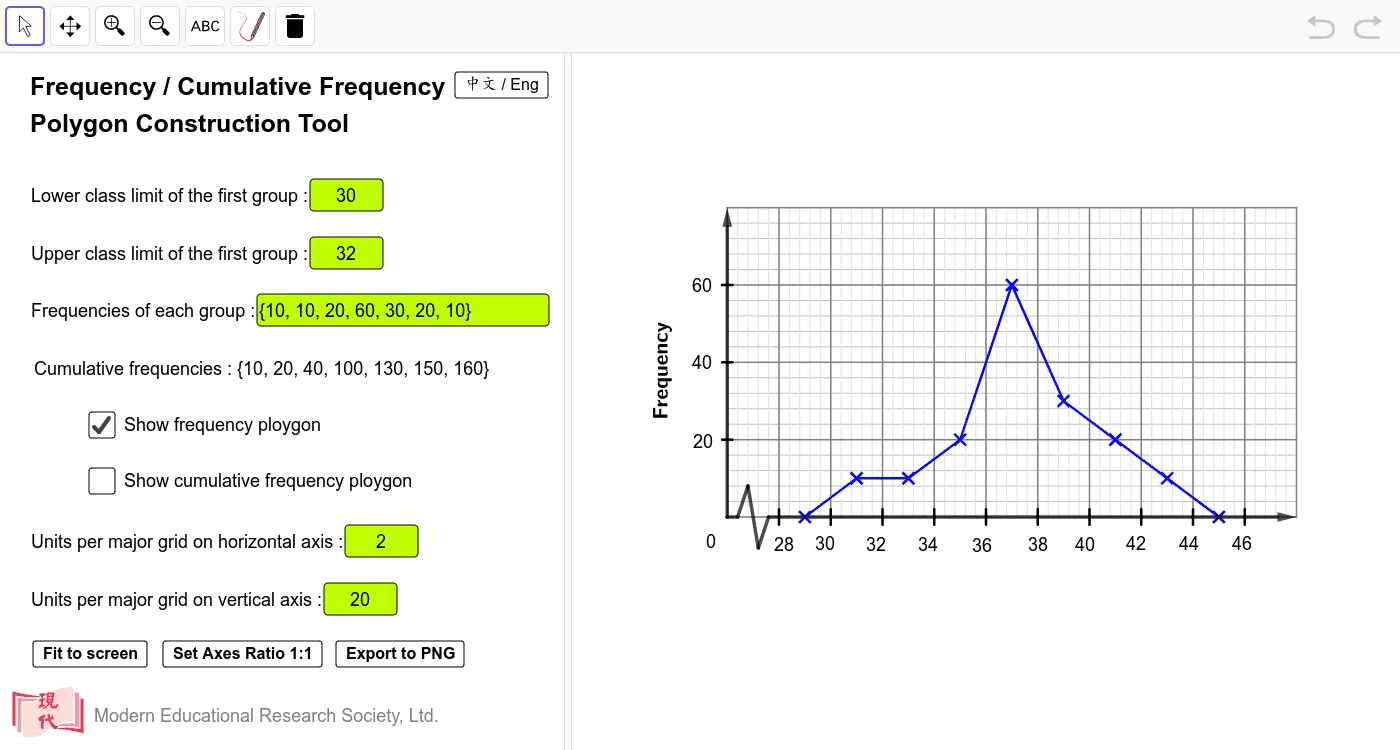
This example demonstrates how to build a frequency polygon and a cumulative frequency polygon from grouped (class-interval) data, turning the statistics table into an interactive polyline graph. It centers on key ideas in probability & statistics: class intervals and class width, frequency (Frequency), cumulative frequency (Cumulative Frequency), and the construction rule that uses class midpoints (often with added start/end points) to close the polygonal shape. The GeoGebra construction uses commands and objects reflected in the provided summary: Length for computed scale/geometry quantities; Sequence to generate point coordinates across classes; Textfield and multiple InputBox controls to enter class limits and frequency/cumulative values; Segment, Vector, Append, Corner, and PolyLine to assemble the connected polygonal lines; If to handle conditional logic and possible errors; and various variables (e.g., class limits, classwidth, xl/xu- and yl/yu-bounds, plus x/y major/minor ticks and scaling factors) to control coordinate mapping and graph readability. Suitable for classroom demonstrations and interactive learning in middle school to early university statistics modules.
GeoGebra Commands & Parameters
Length(freq) → noofgroupSequence(Segment[(i, ylower), (i, yupper)], i, xlower, xupper, xlscale) → xmajorSequence(Segment[(xlower, i), (xupper, i)], i, ylower, yupper, ysscale) → yminorSequence(Segment[(xlower, i), (xupper, i)], i, ylower, yupper, ylscale) → ymajorTextfield(lowerclasslimit) → InputBox1Textfield(upperclasslimit) → InputBox2Sequence(Segment[(i, ylower), (i, yupper)], i, xlower, xupper, xsscale) → xminorSegment(O, (x(O) + xsscale, y(O))) → sec1Segment((x(O) + xsscale, y(O)), (x(O) + (2 * xsscale), y(O) + (2 * ysscale))) → sec2Segment((x(O) + (2 * xsscale), y(O) + (2 * ysscale)), (x(O) + (3 * xsscale), y(O) + (-2 * ysscale))) → sec3Segment((x(O) + (3 * xsscale), y(O) - (2 * ysscale)), (x(O) + (4 * xsscale), y(O))) → sec4Vector(O, Y_e) → yaxiTextfield(freq) → InputBox4Append(Append[((lowerclasslimit + upperclasslimit) / 2 - classwidth, ylower), Sequence[((lowerclasslimit + upperclasslimit) / 2 + ((i - 1) * classwidth), freq(i)), i, 1, noofgroup]], ((lowerclasslimit + upperclasslimit) / 2 + (noofgroup * classwidth), ylower)) → fscatterTextfield(xlscale) → InputBox5Textfield(ylscale) → InputBox6Vector(X_0, X_e) → xaxiSequence(Sum[freq, i], i, 1, noofgroup) → cfreqAppend((upperclasslimit - classwidth, ylower), Sequence[(upperclasslimit + ((i - 1) * classwidth), cfreq(i)), i, 1, noofgroup]) → cfscatterCorner(2, 1) → ZPolyLine(fscatter) → fplotPolyLine(cfscatter) → cfplotSequence(Segment[(lowerclasslimit + ((i - 2) * classwidth), ylower + ysscale / 2), (lowerclasslimit + ((i - 2) * classwidth), ylower - ysscale / 2)], i, 1, noofgroup + 3) → xintSequence(Segment[(x(O) - xsscale / 2, (i * ylscale)), (x(O) + xsscale / 2, (i * ylscale))], i, 1, Div[yupper, ylscale] - 1) → yintIf(Mod[upperclasslimit, 1] ≟ 0, 1, 0.1) → xshiftIf(chi ≟ false, RotateText["Cumulative frequency", 90°], RotateText["累積頻數", 90°]) → text4If(chi ≟ false, RotateText["Frequency", 90°], RotateText["頻數", 90°]) → text5
AI Drawing Prompt Reference
Draw an interactive statistical chart showing a frequency polygon and a cumulative frequency polygon for grouped data. The horizontal axis represents class midpoints, and the vertical axis represents frequency or cumulative frequency. First, draw coordinate axes with grid lines and tick marks. Then, based on entered class limits and frequency values, compute class midpoints, plot points at these midpoints with corresponding frequencies, and connect them with a polyline to form the frequency polygon. Also compute cumulative frequencies, plot points at the upper class boundaries, and connect them to form the cumulative frequency curve. Extend both ends by half a class width to close the polygons to the baseline. Include input boxes for adjusting class limits, frequencies, and scale intervals, with the graph updating dynamically.
The prompt above was compiled from the original drawing commands and is for reference only.