
Equations from a Common Function Family: Parametric Curve Knots
Loading the math board and drawing, please wait…
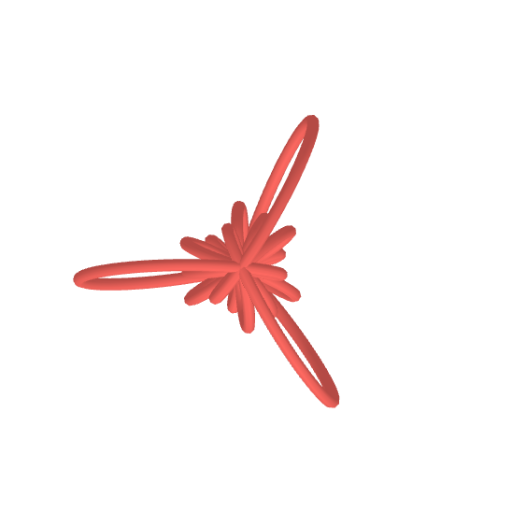
This GeoGebra example demonstrates how a single family of functions can generate a set of equations that, when plotted as parametric Cartesian curves, produce distinct “knot-like” intertwined shapes. It highlights key ideas of parametric curves (coordinates expressed as functions of a parameter), coordinate-geometry graphing in the Cartesian plane, and the notion of a generating set—changing parameters within the same functional family yields a whole curve family with different geometric knot structures. The construction focuses on using the GeoGebra command CurveCartesian to create the curve object (object “a”) from the corresponding equation/parametric expressions derived from the shared function family. Suitable for high school to early university learners studying functions and analytic geometry, as well as for visualization-oriented exploration before deeper calculus topics.
GeoGebra Commands & Parameters
CurveCartesian((((0.8 + (1.6 * sin((6 * b)))) * cos(((0.6 * pi) * sin((12 * b))))) * cos((2 * b))), (((0.8 + (1.6 * sin((6 * b)))) * cos(((0.6 * pi) * sin((12 * b))))) * sin((2 * b))), ((0.8 + (1.6 * sin((6 * b)))) * sin(((0.6 * pi) * sin((12 * b))))), b, 0, (2 * pi)) → a
AI Drawing Prompt Reference
Draw a parametric curve graph generated from a single function family. The curve is defined by three coordinate expressions, each a function of the parameter b. As b varies from 0 to 2π, the curve forms knot-like intertwined shapes. Ensure the graph clearly shows the path and intersection relationships of the curve.
The prompt above was compiled from the original drawing commands and is for reference only.