
Lissajous Curve Generator
Loading the math board and drawing, please wait…
In collections
El dominio del Tiempo (cinemática intuitiva)
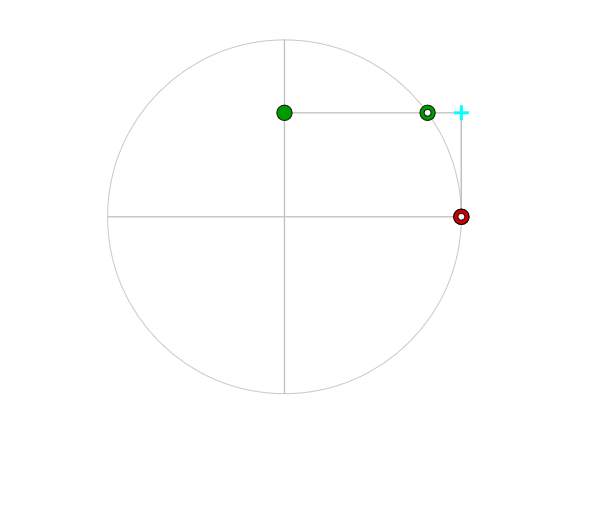
This example demonstrates the generation of Lissajous curves, which are the trajectories of two sine or cosine functions. Lissajous curves are often used in signal analysis. By adjusting parameters, different shapes of Lissajous curves can be generated. The construction uses commands such as Circle, Point, Segment, Rotate, Intersect, and PolyLine.
GeoGebra Commands & Parameters
Circle((0, 0), amplitud) → dPoint(d) → ASegment((amplitud, 0), ((-amplitud), 0)) → diaHRotate(diaH, pi / 2) → diaVIntersect(diaH, OrthogonalLine[A, diaH]) → AxPoint(d) → BIntersect(diaV, OrthogonalLine[B, diaV]) → ByPolyLine(reg) → polPolygon((((-amplitud), (-amplitud)) * 1.1), ((amplitud, (-amplitud)) * 1.1), ((amplitud, amplitud) * 1.1), (((-amplitud), amplitud) * 1.1)) → polígono1, polígono1_{2}, polígono1_{3}, polígono1_{4}, polígono1_{5}
AI Drawing Prompt Reference
Draw a Lissajous curve generator to show the trajectories of two sine or cosine functions. Adjust parameters with a slider to create different shapes of Lissajous curves. Start by drawing a circle, then place points on the circle and its diameters, determine key positions through rotations and intersections, and connect these points with a polyline to form the curve. Enclose the entire figure with a slightly larger square.
The prompt above was compiled from the original drawing commands and is for reference only.