
Sector-to-Cone: Optimizing the Central Angle for Maximum Volume
Loading the math board and drawing, please wait…
In collections
Geometry - Area & Volume
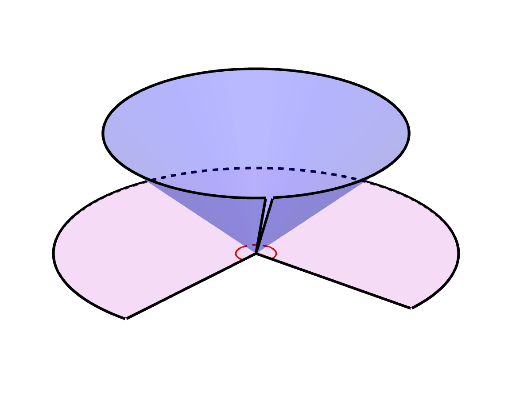
This example demonstrates how a fixed-size 2D sector can be rolled into a 3D cone, and how the cone’s volume changes as the sector’s central angle θ varies. The main goal is to identify the central angle that maximizes the cone volume. Key concepts include sector and circle geometry, geometric constraints from the cone’s net (developed surface), and the optimization of a volume expression with respect to θ—an application of calculus-style maximum (argmax) reasoning. Construction uses GeoGebra commands and objects such as Intersect, CurveCartesian, Circle, Segment, and Length to build and measure the sector geometry and derive cone parameters like cone_r and cone_h from the cut angle (θ_cut) and angle span (θspan). Surface is used to render the cone (surfcone) and the corresponding net (surfnet), while Dilate and Mirror support the layout and visual comparison. Suitable for upper secondary and early university courses on calculus optimization and solid geometry modeling.
GeoGebra Commands & Parameters
Intersect(xAxis, yAxis) → OCurveCartesian((cone_r * cos(u)), (cone_r * sin(u)), cone_h, u, θstart, θend) → dLength(d, θstart, θend) → eSurface(((cone_r * v) * cos(u)), ((cone_r * v) * sin(u)), (v * cone_h), u, θstart, θend, v, 0, 1) → surfconeMirror(A, Plane[xAxis, zAxis]) → A'Segment(A, O) → edgeSegment(A', O) → edge'Surface(((R * v) * cos(u)), ((R * v) * sin(u)), 0, u, θ_{cut} / 2, (2 * pi) - θ_{cut} / 2, v, 0, 1) → surfnetCircle((0, 0, cone_h), cone_r, Vector[(0, 0, 1)]) → circCorner(5) → Dims2dCurveCartesian((R * cos(u)), (R * sin(u)), 0, u, θ_{cut} / 2, (2 * pi) - θ_{cut} / 2) → bMirror(B, xAxis) → B'Segment(B, O) → fSegment(B', O) → hSegment(O, (0, 0, cone_h)) → jSegment(Point[d, 0], (0, 0, cone_h)) → kTextfield(θ) → InputBox1Textfield(θrad) → InputBox2Dilate(b, .1, O) → b'
AI Drawing Prompt Reference
Create an interactive 3D mathematical demonstration showing how a sector of fixed radius rolls into a cone, with the cone's volume dynamically changing as the sector's central angle varies. Include a flat sector net on the bottom plane representing the unfolded cone surface, whose two radial edges curve upward to form the cone's slant height. Show the circular base of the cone at a certain height, with a vertical line segment connecting the cone's apex to the center of the base. Add two input boxes displaying the angle in degrees and radians respectively; when the angle changes, the cone's radius, height, and volume update automatically. Include mirrored copies for visual comparison of how different angles affect the cone's shape.
The prompt above was compiled from the original drawing commands and is for reference only.