
Hyperboloid via Segments
Loading the math board and drawing, please wait…
In collections
Conic Section Collection
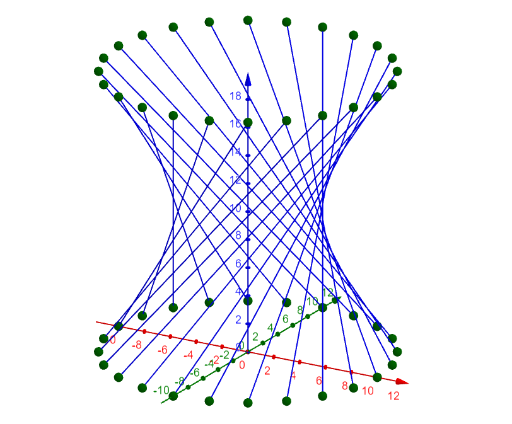
This example demonstrates how to construct a hyperboloid as a ruled surface by sweeping a straight line through space. It involves core math concepts like hyperbola, straight lines, solid geometry, surface, rhombus, trigonometry, real numbers, plane figures, and geometric distribution. The construction uses GeoGebra commands and objects such as Sequence, Translate, a, R2, N, R1, H, list2, list1, θ, list3, list4, list5, list6, b, speed, view, button1, spin, button2. Suitable for high school and above students studying solid geometry, coordinate geometry, and spatial geometric constructions.
GeoGebra Commands & Parameters
Sequence(((If[a, R2, R1] * cos(((2 * pi / N) * t))), (If[a, R2, R1] * sin(((2 * pi / N) * t))), 0), t, 0, N - 1) → list2Sequence(((R1 * cos(((2 * pi / N) * t))), (R1 * sin(((2 * pi / N) * t))), 0), t, 0, N - 1) → list1Translate(Rotate[list1, θ, zAxis], Vector[(0, 0, H)]) → list3Translate(Rotate[list2, (-θ), zAxis], Vector[(0, 0, H)]) → list4Sequence(Segment[Element[list1, t], Element[list3, t]], t, 1, N) → list5Sequence(Segment[Element[list2, t], Element[list4, t]], t, 1, N) → list6
AI Drawing Prompt Reference
Construct a hyperboloid by sweeping a circle with radius R1 and another with R2 around the z-axis and translating them. Then, connect corresponding points on the two surfaces with line segments to form the hyperboloid's surface.
The prompt above was compiled from the original drawing commands and is for reference only.