
Dynamic Exploration of Dini’s Surface: A Constant Negative Curvature Surface
Loading the math board and drawing, please wait…
In collections
Surfaces
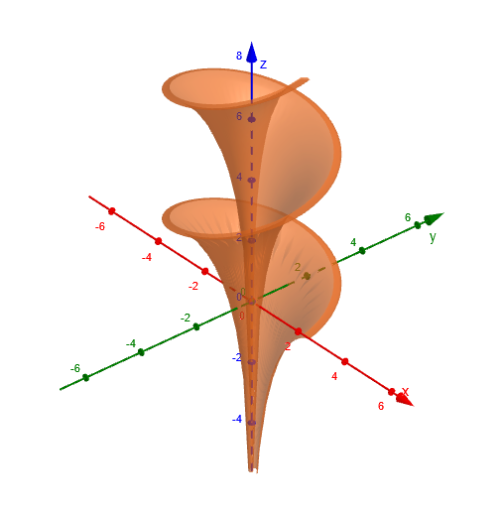
This example uses interactive visualization to explore Dini’s Surface and highlight how a constant negative curvature surface behaves visually as its parameters change. The core ideas include parametric surfaces, geometric intuition from differential geometry (negative curvature), and the construction of surface coordinates using trigonometric functions. The geometry is built in GeoGebra with the Surface command, using the objects listed in the construction summary—a, b, c, d, e, testo1, testo2, and testo3—to parameterize and control the resulting surface and its auxiliary elements. The original theme also points to the use of rotation and trigonometry (cosine and sine) in the underlying parametrization. Suitable for upper-secondary through early university learners, especially for calculus/geometric modeling lessons and investigations of parametric curves/surfaces.
GeoGebra Commands & Parameters
Surface(((a * cos(u)) * sin(v)), ((a * sin(u)) * sin(v)), (a * (cos(v) + ln(tan((0.5 * v))))) + (b * u), u, 0, 12.566370614359172, v, 0.01, 2) → c
AI Drawing Prompt Reference
Draw Dini's Surface, a constant negative curvature surface. Use parameters a and b for parameterization, employing cosine and sine functions to construct surface coordinates. Show the application of rotation and trigonometry, and present auxiliary elements to help understand the surface structure.
The prompt above was compiled from the original drawing commands and is for reference only.