
Dini Surface Construction
Loading the math board and drawing, please wait…
In collections
geometriadinamica.es
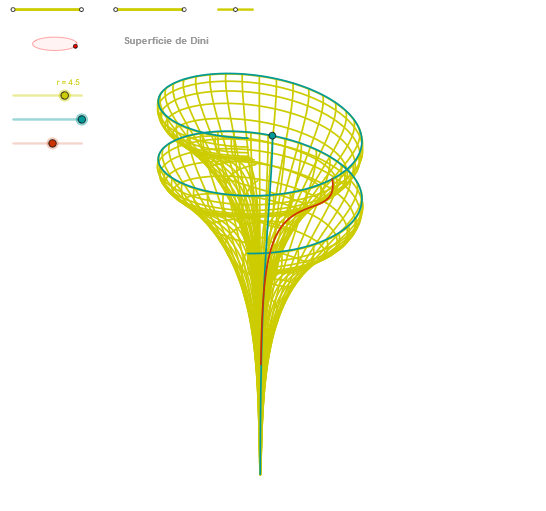
This example demonstrates the construction and dynamic manipulation of a Dini surface in 3D. It involves core mathematical concepts such as parametric equations, trigonometric functions, polar coordinate transformations, and 3D spatial geometry. Key GeoGebra commands and objects used in the construction include Segment, Point, OrthogonalLine, Circle, Intersect, Ellipse, Angle, CurveCartesian, and Sequence. Suitable for high school students, university beginners, and users needing to visualize complex surfaces.
GeoGebra Commands & Parameters
Segment(Q5, Q6) → p5Point(p5) → P5Segment(Q3, Q4) → p2Point(p2) → P3Segment(P3, Q4) → p4Point(p4) → P4Segment(Q1, Q2) → p1Point(p1) → P1Segment(P1, Q2) → p3Point(p3) → P2OrthogonalLine(C, xAxis) → zz2Circle(C, 0.62) → zz0Intersect(zz0, zz2, 1) → ZZ4Intersect(zz0, zz2, 2) → ZZ3Ellipse(ZZ3, ZZ4, 0.65) → zElipse2Point(zElipse2) → ZIntersect(zElipse2, zz2) → ZZ7, ZZ8Angle(ZZ8, C, Z) → zAngIncOrthogonalLine(C, yAxis) → zz1Intersect(zz0, zz1, 2) → ZZ2Intersect(zz0, zz1, 1) → ZZ1Ellipse(ZZ1, ZZ2, 0.65) → zElipse1Point(zElipse1) → XYIntersect(zElipse1, zz1) → ZZ5, ZZ6Angle(ZZ6, C, XY) → zAngRotCurveCartesian((r / 1.5 * ((-sin(v)) * sin(zAngRot))), (r / 1.5 * (((sin(v) * cos(zAngRot)) * sin(zAngInc)) + ((-1 + ln(tan(v / 2)) + (a * 3.14159)) * cos(zAngInc)))) + 2, v, v1, v2) → curva1Segment(ZZ5, ZZ6) → zz4Segment(ZZ7, ZZ8) → zz3Intersect(zElipse2, zElipse1, 1) → zPunto1Intersect(zElipse2, zElipse1, 4) → zPunto2Segment(zPunto1, zPunto2) → zSeg2CurveCartesian((r / 1.5 * (((cos(u) * sin(β)) * sin(zAngRot)) + ((sin(u) * sin(β)) * cos(zAngRot)))), (r / 1.5 * (((((-cos(u)) * sin(β)) * cos(zAngRot)) * sin(zAngInc)) + (((sin(u) * sin(β)) * sin(zAngRot)) * sin(zAngInc)) + ((cos(u) + ln(tan(β / 2)) + (a * u)) * cos(zAngInc)))) + 2, u, u1, u2) → curva2CurveCartesian((r / 1.5 * (((cos((2 * α)) * sin(v)) * sin(zAngRot)) + ((sin((2 * α)) * sin(v)) * cos(zAngRot)))), (r / 1.5 * (((((-cos((2 * α))) * sin(v)) * cos(zAngRot)) * sin(zAngInc)) + (((sin((2 * α)) * sin(v)) * sin(zAngRot)) * sin(zAngInc)) + ((cos((2 * α)) + ln(tan(v / 2)) + ((a * 2) * α)) * cos(zAngInc)))) + 2, v, v1, v2) → a1Sequence(CurveCartesian[(r / 1.5 * (((cos(u) * sin(v)) * sin(zAngRot)) + ((sin(u) * sin(v)) * cos(zAngRot)))), (r / 1.5 * (((((-cos(u)) * sin(v)) * cos(zAngRot)) * sin(zAngInc)) + (((sin(u) * sin(v)) * sin(zAngRot)) * sin(zAngInc)) + ((cos(u) + ln(tan(v / 2)) + (a * u)) * cos(zAngInc)))) + 2, v, v1, v2], u, u1, u2, (2 * paso)) → list2Sequence(CurveCartesian[(r / 1.5 * (((cos(u) * sin(v)) * sin(zAngRot)) + ((sin(u) * sin(v)) * cos(zAngRot)))), (r / 1.5 * (((((-cos(u)) * sin(v)) * cos(zAngRot)) * sin(zAngInc)) + (((sin(u) * sin(v)) * sin(zAngRot)) * sin(zAngInc)) + ((cos(u) + ln(tan(v / 2)) + (a * u)) * cos(zAngInc)))) + 2, u, u1, u2], v, v1, v2, (2 * paso)) → list1
AI Drawing Prompt Reference
Create a complex 3D surface consisting of two ellipses and two curves. The two ellipses intersect at two points, and the curves rotate around the axes of the ellipses. The curve equations involve trigonometric functions, logarithmic functions, and parameters u, v, α, β. Please generate a 3D surface graph with two ellipses and two curves, and adjust the curve colors and line widths as needed.
The prompt above was compiled from the original drawing commands and is for reference only.