
Torus–Sphere Relation Theorem (b) in 3D Geometry
Loading the math board and drawing, please wait…
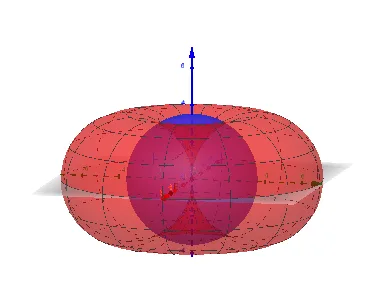
This example demonstrates, via intersection and surface overlay, how a torus–sphere geometric relation (theorem labeled “b”) can be visualized and tracked as parameters change, producing a clear picture of the resulting intersection geometry. Key math concepts include solid geometry, the intersection of curved surfaces, sphere/space parameterization using angular parameters (theta, phi), and theorem-like relationships expressed through geometric constraints. Construction approach in GeoGebra: Intersect is used to compute the intersection points/curve between the relevant surfaces; Point provides reference points; Surface constructs the parametric or implied surface; Sphere builds the sphere; and Segment connects important locations to support the geometric reasoning. From the provided construction summary, objects such as R, theta1, phi1, A, E, F, G, b, theta, phi, a, along with text labels (text1–text4), are used to parameterize geometry, place key points, and annotate the theorem. Suitable for secondary-school enrichment, STEM geometry lessons, and introductory university-level visualization of 3D parameter geometry.
GeoGebra Commands & Parameters
Intersect(zAxis, yAxis) → APoint(xAxis) → ESurface((sin(theta) * (R + (R * cos(phi)))), (cos(theta) * (R + (R * cos(phi)))), (R * sin(phi)), theta, 0, theta1, phi, 0, phi1) → bSphere(A, R) → aSegment(B, C) → f
AI Drawing Prompt Reference
Create a 3D geometric scene showing the intersection relationship between a torus and a sphere. Start by placing a reference point on the coordinate axes and an auxiliary point on the horizontal axis. Then, construct a torus using parametric equations with two angular parameters, limited to specified ranges. Next, draw a sphere centered at the reference point with a fixed radius. Finally, connect two key points with a segment to aid visualization. The overall figure should clearly display the intersection curve or overlapping region between the torus and the sphere, with relevant angle and radius parameters annotated.
The prompt above was compiled from the original drawing commands and is for reference only.