
Geogebra Visualization of the Volume Ratio: Icosahedron vs. Circumscribed Sphere
Loading the math board and drawing, please wait…
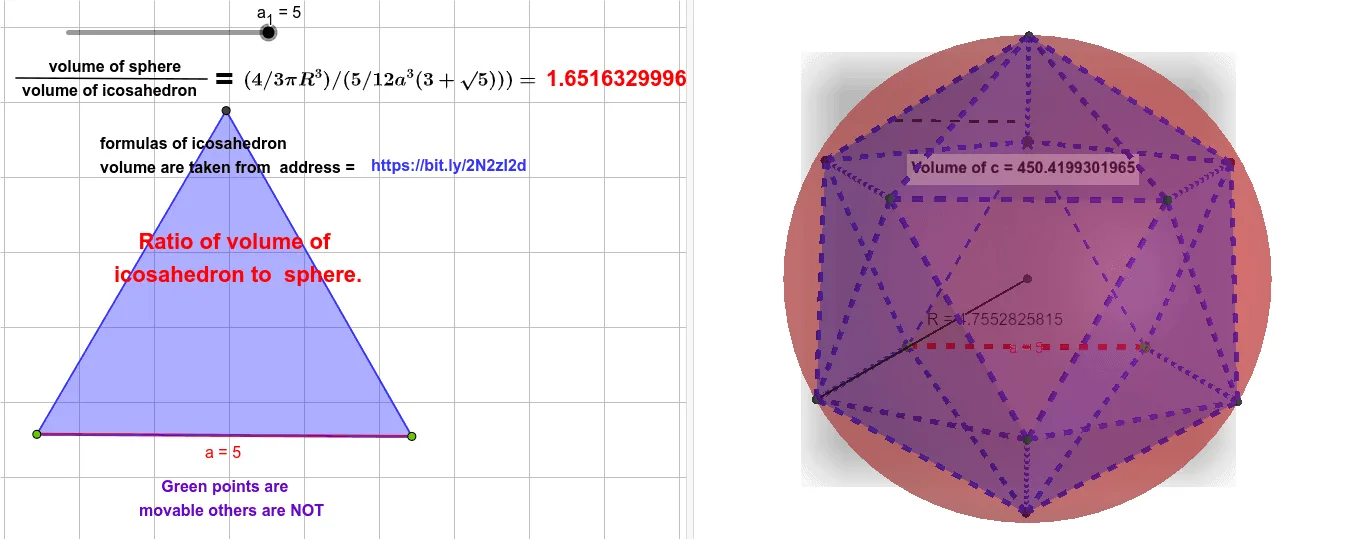
This example builds a 3D construction to demonstrate the volume ratio between a regular icosahedron and its circumscribed sphere (a sphere centered at the same key geometry). It highlights how symmetry and circumscription determine a consistent relationship between two solids. The key math concepts include solid geometry, the structure of the regular icosahedron, sphere volume versus polyhedron volume comparison, and the geometric constraints implied by the circumscribed sphere. Construction-wise, GeoGebra commands such as Point, Segment, Polygon, Icosahedron, Centroid, Midpoint, Sphere, Volume, and PointIn are used to create the icosahedron, locate its centroid and midpoints, generate the sphere, and label/position points. The model also employs explicit triangular face polygons (e.g., faceACF, faceAFG, faceADG, and others) to assemble and control the icosahedron’s surface consistently, while Volume computes each solid’s volume for forming the ratio. Suitable for high school enrichment through early university geometry, especially for exploratory learning and numerical verification of theoretical volume relationships.
GeoGebra Commands & Parameters
Point(Circle[A, a_{1}]) → BSegment(A, B) → aPolygon(A, B, 3) → poly1, g, h, i, CIcosahedron(poly1, true) → b, D, faceACF, faceAFG, faceADG, faceABD, faceBDH, faceBEH, faceBCE, faceCEI, faceCFI, faceEHK, E, faceEIK, faceIKL, faceFIL, faceHJK, faceJKL, faceGJL, faceFGL, faceDHJ, faceDGJ, edgeAF, F, edgeCF, edgeAG, edgeFG, edgeAD, edgeDG, edgeBD, edgeBH, edgeDH, edgeBE, edgeEH, G, edgeCE, edgeCI, edgeEI, edgeFI, edgeEK, edgeHK, edgeIK, edgeIL, edgeKL, edgeFL, H, edgeJK, edgeHJ, edgeJL, edgeGL, edgeGJ, edgeDJ, I, J, K, LCentroid(poly1) → MPolygon(J, K, L) → t1, l, j, kCentroid(t1) → NMidpoint(N, M) → OSphere(O, G) → cVolume(b) → volumebPointIn(b) → PointbVolume(c) → volumecPointIn(c) → PointcSegment(P, Q) → fSegment(O, G) → R
AI Drawing Prompt Reference
Create a 3D scene containing a regular icosahedron and the sphere circumscribed around it (centered at the same key geometry). First define the icosahedron from its base triangular polygonal pieces so that all triangular faces assemble into a complete, symmetric solid with its vertices and edges. Compute the centroid of the icosahedron, then use centroid-related construction points to set the sphere’s center position. Determine the sphere radius from the segment connecting the centroid to a corresponding reference vertex (or equivalent point) and draw the sphere using that radius. Show both solids in the same 3D coordinate system, with them centered consistently, so the volume relationship can be visually compared and labeled.
The prompt above was compiled from the original drawing commands and is for reference only.