
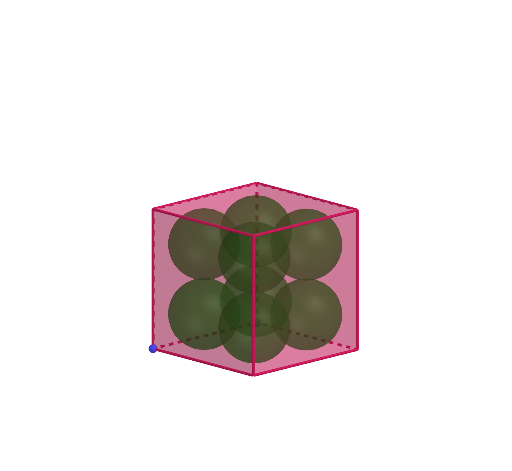
Eight Spheres Arranged Inside a Cube
Loading the math board and drawing, please wait…
This example demonstrates how to construct and visualize eight spheres inside a single cube by using the cube’s symmetric feature points. It highlights 3D solid-geometry ideas: cube structure (faces and edges), midpoint-based symmetry, and geometric construction steps that locate sphere centers in space. The construction uses GeoGebra’s commands to: create key points (Point), build the cube (Cube), compute symmetry-related midpoints (Midpoint), generate perpendicular helper lines (OrthogonalLine), find intersection points to determine precise locations (Intersect), and finally create each sphere with a chosen center (Sphere). The model explicitly relies on cube face and edge objects (e.g., faceABCD, faceADHE, faceABFE, faceBCGF, etc., and edgeAB, edgeBC, edgeCD, edgeAD, edgeAE, edgeDH, edgeEH, edgeEF) together with multiple auxiliary points (A–H plus computed points) that serve as inputs for the eight sphere centers. Suitable for middle/high school solid-geometry learning and for general 3D geometry visualization and construction practice.
GeoGebra Commands & Parameters
Point(Circle[B, Distance[A, B], Segment[A, B]]) → CCube(A, B, C) → a, D, faceCDHG, faceEFGH, edgeAD, edgeAB, edgeBC, edgeCD, edgeAE, edgeDH, edgeEH, edgeEF, E, edgeBF, edgeFG, edgeCG, edgeGH, F, G, H, faceABCD, faceADHE, faceABFE, faceBCGFMidpoint(G, E) → IMidpoint(F, I) → JMidpoint(G, I) → KMidpoint(I, H) → LMidpoint(I, E) → MMidpoint(G, D) → NMidpoint(H, N) → OMidpoint(G, N) → PMidpoint(N, C) → QMidpoint(N, D) → ROrthogonalLine(J, faceEFGH) → fOrthogonalLine(K, faceEFGH) → gOrthogonalLine(L, faceEFGH) → hOrthogonalLine(M, faceEFGH) → iOrthogonalLine(P, faceCDHG) → jOrthogonalLine(Q, faceCDHG) → kOrthogonalLine(R, faceCDHG) → lOrthogonalLine(O, faceCDHG) → mIntersect(i, m) → SIntersect(h, m) → TIntersect(h, l) → UIntersect(i, l) → VSphere(S, M) → bSphere(T, L) → cIntersect(j, f) → WIntersect(g, j) → ZSphere(W, J) → dSphere(Z, K) → eIntersect(k, f) → A_1Intersect(k, g) → B_1Sphere(B_1, Q) → nSphere(U, R) → oIntersect(l, faceABFE) → C_1Intersect(k, faceABFE) → D_1Sphere(V, C_1) → pSphere(A_1, D_1) → q
AI Drawing Prompt Reference
Draw a cube and place eight equal spheres inside it. Start by defining one vertex and an adjacent vertex, then construct the full cube with its six faces and twelve edges. Use symmetry by taking midpoints of certain edges or faces as auxiliary points. From these points, draw lines perpendicular to specific faces; their intersections determine the eight sphere centers. Finally, create eight spheres centered at these points with radius equal to half the cube's edge length, so they fit symmetrically near the cube's corners.
The prompt above was compiled from the original drawing commands and is for reference only.