
Dodecahedron Nets and Pyramid-Based 3D Construction
Loading the math board and drawing, please wait…
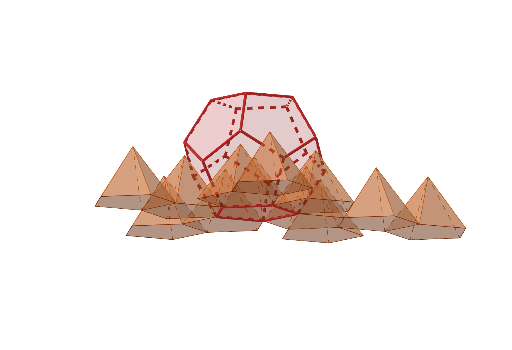
This example demonstrates how to build a 3D geometric composition from a dodecahedron by creating pyramid-like solids associated with its faces and assembling them into a coherent spatial model. It highlights key ideas in solid geometry: the relationship between faces and vertices of a dodecahedron, constructing a net (net unfolding) for planar-to-spatial visualization, and using geometric primitives to define connections via centroid-based reference points. The construction uses GeoGebra commands reflected in the script: Polygon to define face polygons, Dodecahedron to generate the base solid, Net to obtain the unfolding layout, Centroid to locate the central reference point, OrthogonalLine to create perpendicular/auxiliary lines, Intersect and Distance to determine key geometric relations, and Pyramid (optionally with Sphere as part of the visualization/structure) to form the pyramid solids from selected faces. Multiple face* objects (e.g., faceAEIOJ, faceABFKJ, faceBCGLF, etc.) organize the assembled surfaces, while edge* objects (e.g., edgeAJ, edgeEI) emphasize connectivity. Suitable for advanced secondary school and early university courses focused on spatial reasoning, polyhedra, and 3D geometric modeling.
GeoGebra Commands & Parameters
Polygon(A, B, 5, xOyPlane) → poly1, f, g, h, i, j, C, D, EDodecahedron(poly1, true) → a, F, O, P, Q, R, S, T, faceAEIOJ, faceABFKJ, faceBCGLF, faceCDHMG, G, faceDEINH, faceINSTO, faceJKPTO, faceFKPQL, faceGLQRM, faceHMRSN, facePQRST, edgeAJ, edgeEI, edgeIO, H, edgeJO, edgeJK, edgeFK, edgeBF, edgeFL, edgeGL, edgeCG, edgeGM, edgeHM, edgeDH, I, edgeHN, edgeIN, edgeNS, edgeST, edgeOT, edgePT, edgeKP, edgePQ, edgeLQ, edgeQR, J, edgeMR, edgeRS, K, L, M, NNet(a, p) → b, U, F_1, G_1, H_1, I_1, J_1, K_1, L_1, M_1, N_1, O_1, V, P_1, Q_1, R_1, S_1, T_1, U_1, V_1, W_1, Z_1, A_2, W, B_2, C_2, D_2, E_2, F_2, G_2, H_2, I_2, J_2, face1, Z, face6, face3, face2, face4, face5, face11, face10, face7, face8, face9, A_1, face12, edge1, edgeUV, edgeVW, edgeWZ, edge8, edge10, edge35, edge33, edge12, B_1, edge11, edge13, edge14, edge2, edge3, edge19, edge20, edge4, edge5, edge25, C_1, edge26, edge6, edge7, edge31, edge32, edge9, edge36, edge39, edge40, edge37, D_1, edge38, edge45, edge46, edge34, edge15, edge17, edge18, edge16, edge21, edge23, E_1, edge24, edge22, edge27, edge29, edge30, edge28, edge41, edge43, edge44, edge42Centroid(faceGLQRM) → K_2Centroid(facePQRST) → L_2OrthogonalLine(L_2, facePQRST) → kOrthogonalLine(K_2, faceGLQRM) → lIntersect(k, l) → M_2Distance(L_2, M_2) → htPyramid(face8, ht) → d, O_2, edge55, edge56, face18, face19, face21, face22, face20, edge53, edge52, edge54Pyramid(face12, ht) → e, P_2, edge60, edge61, face23, face24, face26, face27, face25, edge58, edge57, edge59Pyramid(face11, ht) → m, Q_2, edge65, edge66, face28, face29, face31, face32, face30, edge63, edge62, edge64Pyramid(face10, ht) → n, R_2, edge70, edge71, face33, face35, face36, face37, face34, edge67, edge68, edge69Pyramid(face6, ht) → o, S_2, edge76, edge74, face38, face39, face42, face41, face40, edge73, edge72, edge75Pyramid(face3, ht) → q, T_2, edge80, edge81, face43, face45, face46, face47, face44, edge77, edge78, edge79Pyramid(face7, ht) → r, U_2, edge85, edge86, face48, face49, face51, face52, face50, edge83, edge82, edge84Pyramid(face1, ht) → s, V_2, edge89, edge90, face54, face53, face55, face56, face57, edge91, edge87, edge88Pyramid(face4, ht) → t, W_2, edge95, edge96, face58, face59, face61, face62, face60, edge93, edge92, edge94Pyramid(face2, ht) → u, Z_2, edge100, edge101, face63, face64, face66, face67, face65, edge98, edge97, edge99Pyramid(face9, ht) → v, A_3, edge105, edge106, face68, face69, face71, face72, face70, edge103, edge102, edge104Pyramid(face5, ht) → w, B_3, edge110, edge111, face73, face74, face76, face77, face75, edge108, edge107, edge109Sphere(B_3, H_2) → c
AI Drawing Prompt Reference
Draw a dodecahedron and construct pyramids from each face, using the centroid of each face as the base point, ensuring the height of each pyramid is the same. Start by drawing a pentagon as one face of the dodecahedron, then generate the dodecahedron, unfold it into a net, find the centroid of each face, draw perpendicular lines from these centroids to determine the height, and finally construct pyramids from each face.
The prompt above was compiled from the original drawing commands and is for reference only.