
Geometric Construction of a 3D Block
Loading the math board and drawing, please wait…
In collections
Vector Mechanics & Statics
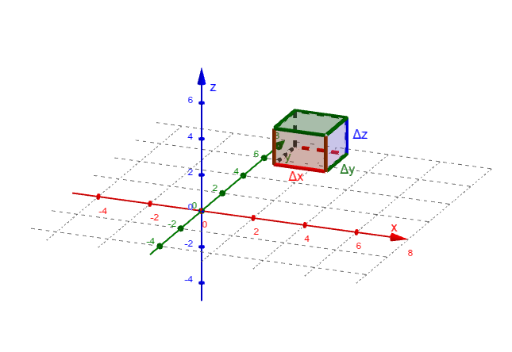
This example demonstrates how to build a 3D block-like solid in space by constructing and connecting planar polygons. It highlights core ideas from 3D coordinate geometry and spatial vector modeling, where points, edges, and faces are derived from vectors and parameters to assemble a complete solid. Construction uses GeoGebra commands Polygon to create the faces, Vector to define direction/offset information, and Segment to form the edges between key vertices. The construction summary indicates the presence of coordinate increments (Δx, Δy, Δz), base coordinates (x0, y0, z0), multiple labeled vertices (A–H), and parameterized components (such as a–h, b, c, d, e, f, g, h with indexed variants like q1–q6) that drive the step-by-step creation of the solid’s geometry. Suitable for advanced middle school through early university geometry instruction and for learners practicing 3D modeling in GeoGebra.
GeoGebra Commands & Parameters
Polygon(B, F, G, C) → q1, b, f, g, cPolygon(B, A, E, F) → q2, b_1, a, e, f_1Polygon(A, D, C, B) → q3, a_1, d, c_1, b_2Polygon(E, H, G, F) → q4, e_1, h, g_1, f_2Polygon(E, A, D, H) → q5, e_2, a_2, d_1, h_1Polygon(H, D, C, G) → q6, h_2, d_2, c_2, g_2Vector(I, J) → uVector(J, K) → vVector(K, A) → wSegment(E, A) → jSegment(F, E) → k
AI Drawing Prompt Reference
Draw a 3D solid block made of multiple planar polygons. Key objects include points A, B, C, D, E, F, G, H, and the planar polygons formed by these points. The construction order starts from point B, connecting points A, E, F, G, C, etc., to form multiple planar faces. Then define direction and offset information using vectors, and connect key vertices with line segments. Ensure the solid maintains coherence in three-dimensional space.
The prompt above was compiled from the original drawing commands and is for reference only.