
Vector Projection in Two Dimensions
Loading the math board and drawing, please wait…
In collections
Vector Mechanics & Statics
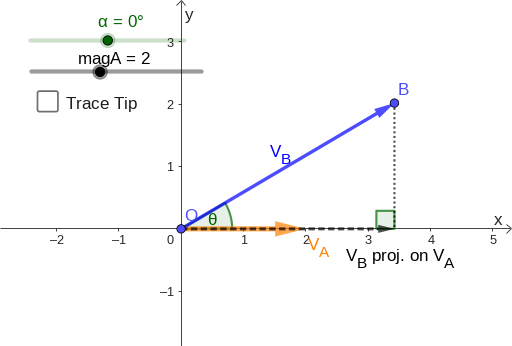
This example demonstrates the calculation and visualization of vector projection in two-dimensional space. It dynamically shows the projection length and vector of one vector onto another, aiding in understanding the core concept of vector projection. Key math concepts include vector dot product, magnitude, angle calculation, and linear functions. GeoGebra commands like Vector, Segment, and Angle are used to construct vectors A, unit vector u, projection point P, etc., with sliders for dynamic visualization. Suitable for high school coordinate geometry and linear algebra teaching.
GeoGebra Commands & Parameters
Vector(O, A) → uVector(O, B) → vSegment(B, P) → fVector(O, P) → wAngle(P, O, B) → βAngle(B, P, O) → γ
AI Drawing Prompt Reference
Draw a vector projection diagram with two vectors, a projection point, a unit vector, and two angles. The two vectors should start from the origin, the projection point should be the projection of one vector onto another, the unit vector should be the unit vector of one of the vectors, and the two angles should be the angle between the projection point and the origin and the angle between the projection point and the other vector.
The prompt above was compiled from the original drawing commands and is for reference only.