
Adding Vectors
Loading the math board and drawing, please wait…
In collections
Vector Mechanics & Statics
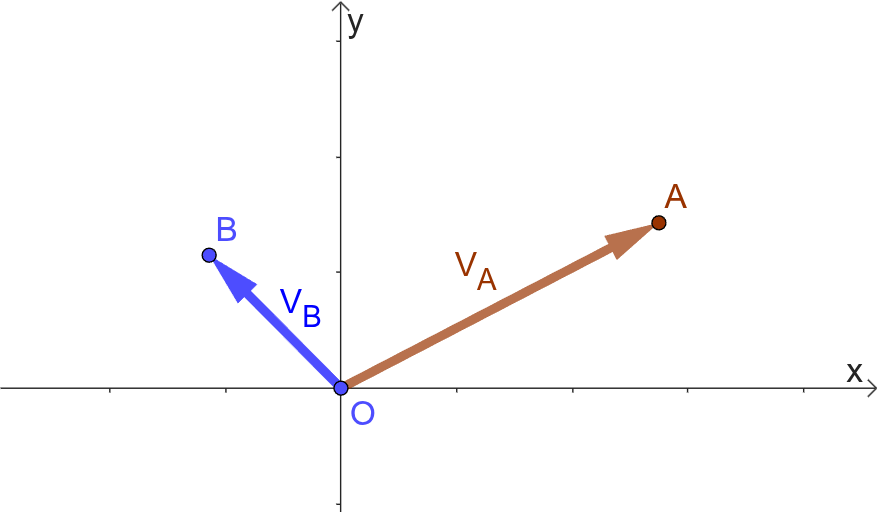
This example demonstrates the addition of vectors, showcasing several methods for performing vector addition. Key mathematical concepts include the definition of vectors, vector operations, and vector graphical representation. Construction points include using GeoGebra's Vector, Midpoint, and Line commands to draw vectors and graphs. Suitable for middle school math, linear algebra, and engineering graphics.
GeoGebra Commands & Parameters
ConstructionStep() → nVector(O, A) → uVector(O, B) → vMidpoint(AB, A) → CMidpoint(B, AB) → DLine(B, AB) → fLine(A, AB) → gVector(O, AB) → w
AI Drawing Prompt Reference
Draw a diagram illustrating vector addition. Start with two free vectors originating from a common point, pointing to two distinct endpoints. Then, construct a line segment connecting these two endpoints, and mark two midpoints on this segment, one near each endpoint. Next, draw two parallel lines through the endpoints, each parallel to the segment. Finally, from the common starting point, draw a new vector pointing to the opposite end of the segment, representing the sum of the two original vectors. The figure should clearly show the geometric construction of vector addition.
The prompt above was compiled from the original drawing commands and is for reference only.