
Curved Surface Area of a Right Pyramid via Geometric Construction
Loading the math board and drawing, please wait…
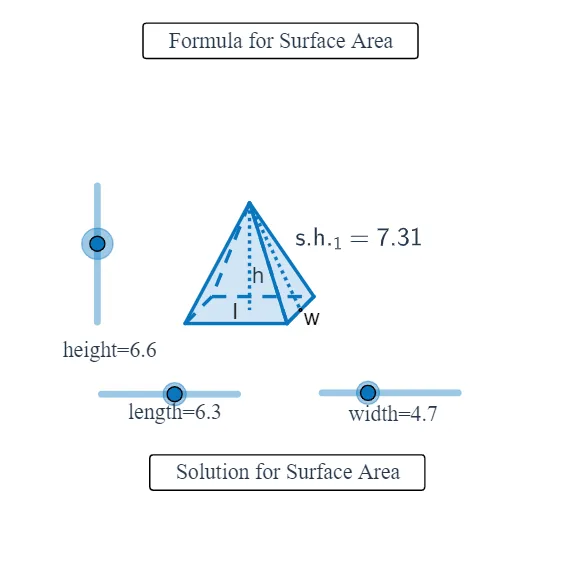
This example demonstrates how the curved surface area of a right pyramid can be visualized and constructed using geometric unfolding and correspondence between pyramid faces and planar regions. The key math ideas include the pyramid’s slant height, the transformation from 3D side faces to an equivalent planar arrangement, and the use of circular arcs to represent the sector-like relationship in the construction. It also relies on fundamental geometry-construction concepts: creating polygons from key vertices, locating midpoints, drawing perpendicular/orthogonal lines, and maintaining proportions through vector-based transformations. From the GeoGebra construction summary, the model uses commands such as Line, Circle, Intersect, Vector, Translate, Dilate, and Midpoint for positioning and controlled transformations; Polygon and Segment to form faces and boundaries; If to switch construction cases; and OrthogonalLine, CircleArc, CircumcircleArc, Center, and Ray to build the arc structures tied to the unfolded layout. Suitable for secondary school solid-geometry learning and early university teaching, especially to build intuition for “unfolding → area correspondence.”
GeoGebra Commands & Parameters
Line(J, K) → hCircle(J, width) → gIntersect(g, h, 1) → MVector(J, M) → wTranslate(A, Vector[w / 2]) → CDilate(I, length, H) → LVector(H, L) → vTranslate(C, v) → DMidpoint(C, D) → Q_1Translate(A, v) → BMidpoint(A, B) → YLine(Y, Q_1) → g_1Midpoint(C, B) → NCircle(Q_1, N) → k_1Intersect(k_1, g_1, 2) → V_1Dilate(F, height, E) → GVector(E, G) → uTranslate(N, u) → OPolygon(A, B, D, C) → P, a, b, d, cPolygon(O, C, D) → Q, d_1, o, c_1Polygon(O, A, C) → R, c_2, o_1, a_1Polygon(O, D, B) → S, b_1, o_2, d_2Polygon(O, A, B) → T, b_2, o_3, a_2Midpoint(B, D) → USegment(O, N) → eSegment(O, U) → fMidpoint(O, U) → WMidpoint(O, N) → VIf(height ≤ 5, C) → ZSegment(Z, O) → iSegment(Z, A) → jLine(N, U) → kIntersect(k, c) → E_1OrthogonalLine(E_1, k) → lOrthogonalLine(U, k) → mCircle(E_1, width / 2) → pIntersect(p, l, 2) → F_1OrthogonalLine(F_1, l) → nIntersect(p, l, 1) → G_1OrthogonalLine(G_1, l) → qIntersect(m, n) → H_1Intersect(m, q) → I_1Midpoint(F_1, H_1) → J_1Midpoint(I_1, G_1) → K_1Line(J_1, K_1) → rCircle(E_1, A1) → sMidpoint(H_1, I_1) → L_1Circle(U, A1) → tIntersect(s, k, 1) → M_1Intersect(t, k, 2) → N_1Circle(J_1, A2) → e_1Circle(K_1, A2) → f_1Intersect(e_1, r, 1) → O_1Intersect(f_1, r, 2) → P_1Vector(O, M_1) → z_1Vector(O, N_1) → i_1Midpoint(Q_1, N) → R_1Midpoint(Y, N) → S_1Circle(S_1, O) → q_1Intersect(q_1, g_1, 1) → T_1Vector(T_1, P_1) → u_1Vector(O, T_1) → w_1Vector(A, G_1) → l_1Vector(B, I_1) → n_1Vector(D, H_1) → r_1Circle(V_1, O) → h_1Vector(C, F_1) → s_1Intersect(h_1, g_1, 2) → U_1Vector(O, U_1) → zVector(U_1, O_1) → j_1CircleArc(S_1, O, T_1) → p_1CircleArc(V_1, U_1, O) → t_1CircumcircleArc(M_1, O, N_1) → e_2Center(e_2) → W_1Translate(O, Vector[(w_1 * m_1)]) → O'Translate(O, Vector[(z_1 * (m_1 - 1))]) → O'_1Translate(O, Vector[(z * (m_1 - 2))]) → O'_2Translate(O, Vector[(i_1 * (m_1 - 3))]) → O'_3Translate(T_1, Vector[(u_1 * (m_1 - 4))]) → Z_1Translate(U_1, Vector[(j_1 * (m_1 - 4))]) → A_2Ray(S_1, O') → f_2Intersect(p_1, f_2, 1) → C_2If(m_1 ≤ 0, O, If[m_1 < 1, C_2, If[m_1 < 4, T_1, If[m_1 < 5, Z_1, P_1]]]) → B_2Ray(W_1, O'_1) → g_2Intersect(e_2, g_2, 1) → D_2If(m_1 ≤ 1, O, If[m_1 < 2, D_2, M_1]) → E_2Ray(W_1, O'_3) → h_2Intersect(e_2, h_2, 1) → F_2If(m_1 ≤ 3, O, If[m_1 < 4, F_2, N_1]) → G_2Ray(V_1, O'_2) → i_2Intersect(t_1, i_2, 1) → H_2If(m_1 ≤ 2, O, If[m_1 < 3, H_2, If[m_1 < 4, U_1, If[m_1 < 5, A_2, O_1]]]) → I_2Translate(A, Vector[(l_1 * (m_1 - 4))]) → A'Translate(B, Vector[(n_1 * (m_1 - 4))]) → B'Translate(D, Vector[(r_1 * (m_1 - 4))]) → D'Translate(C, Vector[(s_1 * (m_1 - 4))]) → C'If(m_1 ≤ 4, A, If[m_1 < 5, A', G_1]) → J_2If(m_1 ≤ 4, C, If[m_1 < 5, C', F_1]) → K_2If(m_1 ≤ 4, D, If[m_1 < 5, D', H_1]) → L_2If(m_1 ≤ 4, B, If[m_1 < 5, B', I_1]) → M_2Polygon(E_2, K_2, J_2) → poly1, j_2, e_3, k_2Polygon(J_2, M_2, B_2) → poly2, b_3, j_3, m_2Polygon(M_2, G_2, L_2) → poly3, l_2, m_3, g_3Polygon(L_2, I_2, K_2) → poly4, k_3, l_3, i_3Polygon(K_2, J_2, M_2, L_2) → poly5, k_4, j_4, m_4, l_4Segment(U, G_2) → n_2Midpoint(U, G_2) → N_2Midpoint(O, U) → O_2Vector(P_2, N_2) → u_2Vector(P_2, O_2) → v_2Segment(N, O) → p_2Midpoint(O, N) → Q_2Segment(A, O) → q_2Segment(B, O) → r_2Segment(D, O) → t_2Segment(C, O) → a_3Segment(U, O) → c_3Midpoint(K_2, L_2) → R_2Segment(R_2, A_2) → d_3Midpoint(Q_2, I_2) → S_2Vector(T_2, S_2) → w_2Segment(J_2, K_2) → f_3
AI Drawing Prompt Reference
Draw the lateral surface area of a right square pyramid, consisting of four isosceles triangles, each with the base as one side of the square and the height as the slant height. Start by creating the four vertices of a square, then construct four isosceles triangles using these vertices. Next, unfold these triangles along their bases to form a planar layout. Finally, adjust the proportions and positions to ensure each triangle is correctly shaped and sized, completing the lateral surface area diagram.
The prompt above was compiled from the original drawing commands and is for reference only.