
Unexpected Maximum in a Family of Rectangles
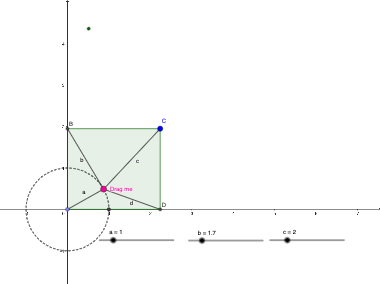
Loading the math board and drawing, please wait…
This example demonstrates the unexpected maximum value of a rectangle family under certain constraints. Key mathematical concepts include similarity transformations, area calculation, and optimization. Construction involves using GeoGebra commands like Point, OrthogonalLine, Intersect to build rectangles and adjust parameters. Suitable for high school students learning geometric optimization and function graphing, useful in mathematical modeling and geometric construction.
GeoGebra Commands & Parameters
Point(xAxis) → AOrthogonalLine(A, xAxis) → gOrthogonalLine(A, g) → hIntersect(h, xAxis) → FCircle(A, a) → d_{2}Point(d_{2}) → PCircle(P, c) → eCircle(P, b) → fSegment(P, A) → iIntersect(f, g, 2) → BLine(B, h) → jIntersect(e, j, 1) → CLine(C, g) → kIntersect(h, k) → DSegment(B, P) → dSegment(P, C) → mSegment(P, D) → nPolygon(B, A, D, C) → q1, c_1, a_1, e_1, d_1Intersect(d_{2}, a_1, 1) → B_{1}Intersect(d_{2}, xAxis, 2) → EAngle(E, A, P) → α
AI Drawing Prompt Reference
On a coordinate plane’s horizontal axis, choose a starting point. Draw a line through it perpendicular to the horizontal axis, then construct another line through the same point that is perpendicular to the first one, and take the intersection of this second line with the horizontal axis as a key point. Construct several circles: draw a circle centered at the starting point, pick a point on that circle, then draw two circles centered at that picked point. Using intersections of one of these circles with the perpendicular-line pair, determine a second point; draw a line through this second point and intersect it with the other circle to obtain a third point. Finally, use the points to form a quadrilateral (in the order of the constructed vertices) and mark the angle at the starting point formed by the segments to the chosen points.
The prompt above was compiled from the original drawing commands and is for reference only.