
Missing vs. Extra Square? Area Difference via Similar Triangles
Loading the math board and drawing, please wait…
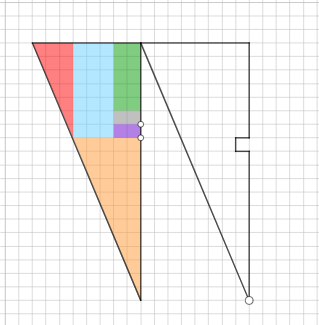
This example visualizes a “missing square vs. extra square” situation by comparing the areas produced by a carefully built geometric configuration, revealing an invariance-style relationship driven by the underlying similarity. The key ideas are similar triangles and similarity transformations, which convert geometric alignment into proportional lengths and hence controlled area differences (area/difference reasoning). Construction in GeoGebra uses Segment, Polygon, Circle, Point, Line, OrthogonalLine, and Intersect to build the framework: key points and edges are created with Point and Segment; polygonal regions and auxiliary boundaries are formed with Polygon; additional references such as curved loci are provided by Circle; structural relations are enforced using Line and OrthogonalLine (for parallel/perpendicular setups); and crucial vertices are obtained through Intersect. The resulting square-related regions can then be compared to decide whether a square is effectively “missing” or “extra.” Suitable for advanced secondary school students and early undergraduate learners studying similarity geometry, area proportion, and geometric construction.
GeoGebra Commands & Parameters
Segment(G, H) → gSegment(H, F) → hPolygon(I, K, L) → t1, l, i, kPolygon(M, N, O) → t2, o, m, nCircle(P, 7) → cPoint(c) → QLine(P, Q) → jOrthogonalLine(Q, j) → pCircle(Q, 3) → dIntersect(d, p, 2) → ROrthogonalLine(R, p) → qOrthogonalLine(P, j) → rIntersect(q, r) → SPolygon(P, Q, R, S) → q1, p_1, q_1, r_1, sCircle(T, 5) → ePoint(e) → ULine(T, U) → tOrthogonalLine(U, t) → aCircle(U, 2) → c_1Intersect(c_1, a, 2) → VOrthogonalLine(T, t) → bOrthogonalLine(V, a) → f_1Intersect(b, f_1) → WPolygon(T, U, V, W) → q2, t_1, u, v, wCircle(Z, 2) → d_1Circle(A_1, 2) → e_1Point(d_1) → B_1Point(e_1) → C_1Line(Z, B_1) → g_1Line(A_1, C_1) → h_1OrthogonalLine(B_1, g_1) → i_1OrthogonalLine(C_1, h_1) → j_1Circle(B_1, 1) → k_1Circle(C_1, 1) → s_1Intersect(k_1, i_1, 2) → D_1Intersect(s_1, j_1, 2) → E_1OrthogonalLine(D_1, i_1) → l_1OrthogonalLine(Z, l_1) → m_1OrthogonalLine(E_1, j_1) → n_1OrthogonalLine(A_1, h_1) → a_1Intersect(l_1, m_1) → F_1Intersect(n_1, a_1) → G_1Polygon(Z, B_1, D_1, F_1) → q3, z_1, b_1, f_2, g_2Polygon(A_1, C_1, E_1, G_1) → q4, h_2, i_2, j_2, k_2Segment(K_1, I_1) → l_2Segment(I_1, H_1) → m_2Segment(H_1, J_1) → n_2Segment(J_1, G) → p_2Segment(F, K_1) → fSegment(E, A) → s_2Segment(A, L_1) → q_2Segment(L_1, E) → r_2
AI Drawing Prompt Reference
Draw a geometric configuration demonstrating the missing square versus extra square puzzle. Start by creating two triangular regions as reference points. Then, from a point on a circle, draw a line to the circle's center, construct a perpendicular through that point, find intersections with another circle of radius 3, and use multiple perpendicular lines to determine four vertices, forming the first quadrilateral region. Construct a second quadrilateral region in a similar manner at another location. Finally, create two more similar quadrilaterals, each determined by points on circles, connecting lines, perpendiculars, nested circles and perpendicular lines to establish four vertices, creating four comparable square-related regions connected by line segments, showing area differences driven by similarity relationships.
The prompt above was compiled from the original drawing commands and is for reference only.