
Tutorial on Points, Lines, and Constructing Midpoints
Loading the math board and drawing, please wait…
In collections
Authomath GeoGebra Basics Course
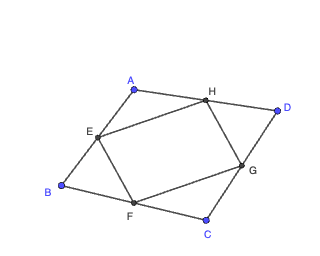
This example demonstrates how to use basic geometric entities—points and segments—to construct the midpoint of a segment, forming a foundation for more advanced constructions. Key concepts include the definition and property of a segment midpoint (it divides the segment into two equal parts) and how reliable geometric results can be obtained through systematic construction steps. Construction-wise, the provided GeoGebra commands are “Segment” and “Midpoint”: first create segments from given endpoint pairs, then apply “Midpoint” to each target segment to generate the corresponding midpoint points. The object list (multiple labeled points and constructed elements) indicates the workflow can be repeated for several segments to reinforce understanding. Suitable for middle school to early high school geometry lessons, guided classroom demonstrations, and foundational learning of geometric construction methods in GeoGebra.
GeoGebra Commands & Parameters
Segment(A, B) → fSegment(B, C) → gSegment(C, D) → hSegment(D, A) → iMidpoint(A, B) → EMidpoint(B, C) → FMidpoint(C, D) → GMidpoint(D, A) → HSegment(E, F) → jSegment(F, G) → kSegment(G, H) → lSegment(E, H) → m
AI Drawing Prompt Reference
On a plane, place four given endpoints A, B, C, and D. Connect them to form the four boundary segments: the segment from A to B, from B to C, from C to D, and from D to A. Next, mark the midpoint of each boundary segment: E for AB, F for BC, G for CD, and H for DA. Finally, draw connecting segments between these midpoints by joining E–F, F–G, G–H, and E–H to create an inner set of connections.
The prompt above was compiled from the original drawing commands and is for reference only.