
Parallelogram in a Coordinate System: Vector-Based Construction
Loading the math board and drawing, please wait…
In collections
Parallelogramm und Raute: Eigenschaften und Konstruktionen
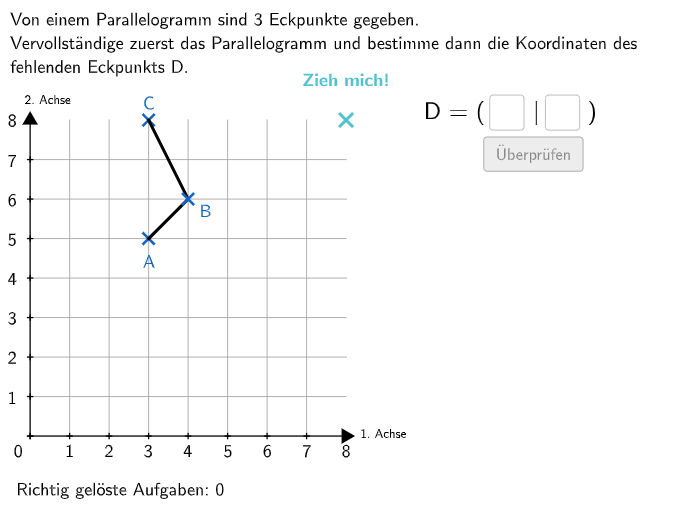
This GeoGebra example demonstrates how to construct a parallelogram inside a coordinate system using vector relationships and basic coordinate geometry. Students can observe the defining properties—opposite sides being parallel and equal—through an interactive, construction-style setup. Key concepts include the definition of a parallelogram, representing edges with vectors, coordinate geometry with points and lines, and generating the final shape via a polygon from constructed components. Construction highlights from the command/object list: Sequence, Shuffle, and Join are used to create and randomize candidate parameters; Vector, Line, and Point build the geometric framework; Intersect and Polygon assemble the parallelogram; IsInRegion and RemoveUndefined help ensure validity under region/constraint checks; If supports conditional construction logic; Angle and Textfield/Text/Append provide angle measurement and parameter labeling. The objects include an origin (Ursprung), vector directions (ux, uy), coordinate lists (e.g., AXList, AYList, etc.), and the resulting parallelogram element (Polygon such as A). Suitable for grades 5–6 and as a classroom activity to strengthen geometry construction skills with compass/ruler/DGS-style thinking.
GeoGebra Commands & Parameters
Sequence(Sequence[(i, k), k, 0, 8], i, 0, 8) → PunkteFeldShuffle(Sequence[1, 7]) → HelperX, {2, 3, 5, 1, 4, 6, 7}Join({{0}, HelperX}) → UrsprungXListeShuffle(Sequence[1, 7]) → HelperY, {5, 2, 4, 1, 7, 3, 6}Join({{0}, HelperY}) → UrsprungYListeShuffle(Sequence[1, 7]) → AYList, {5, 2, 6, 1, 4, 7, 3}Shuffle(Sequence[1, 7]) → AXList, {3, 5, 7, 2, 6, 4, 1}Vector(Ursprung, A) → aCoordsLine(A, A + (-1, 0)) → iLine(A, A + (0, 1)) → hMax({distanceAnegX, distanceAposX, distanceAnegY, distanceAposY}) → maxfShuffle(Sequence[3, maxf - 1, 1]) → fList, {3, 4}Random(1, fwert - 1) → erandoCircle(A, fwert) → cIntersect(c, h) → CSucheNegY, CSuchePosYIntersect(c, i) → CSuchePosX, CSucheNegXPolygon(QE1, QE2, QE3, QE4) → coordsystem, qe1, qe2, qe3, qe4RemoveUndefined({If[IsInRegion[CSuchePosY, coordsystem], y(CSuchePosY)], If[IsInRegion[CSuchePosX, coordsystem], y(CSuchePosX)], If[IsInRegion[CSucheNegX, coordsystem], y(CSucheNegX)], If[IsInRegion[CSucheNegY, coordsystem], y(CSucheNegY)]}) → CyOptionenRemoveUndefined({If[IsInRegion[CSuchePosY, coordsystem], x(CSuchePosY)], If[IsInRegion[CSuchePosX, coordsystem], x(CSuchePosX)], If[IsInRegion[CSucheNegX, coordsystem], x(CSucheNegX)], If[IsInRegion[CSucheNegY, coordsystem], x(CSucheNegY)]}) → CxOptionenRandom(1, Length[CxOptionen]) → CrandoVector(Ursprung, C) → cCoordsSegment(A, C) → jOrthogonalLine(MittelpunktDeltoid, j) → kPoint(PunkteFeld) → InputPunktMin(AbstaendeMittelpunkt) → maxeShuffle(Sequence[1, maxe]) → eList, {1}Circle(MittelpunktDeltoid, ewert) → dIntersect(d, k) → D, BVector(Ursprung, DNew) → dCoordsVector(Ursprung, B) → bCoordsShuffle({2, 4}) → gesuchtList, {2, 4}If(gesucht ≟ 1, x(aCoords), gesucht ≟ 2, x(bCoords), gesucht ≟ 3, x(cCoords), gesucht ≟ 4, x(dCoords)) → solxIf(gesucht ≟ 1, y(aCoords), gesucht ≟ 2, y(bCoords), gesucht ≟ 3, y(cCoords), gesucht ≟ 4, y(dCoords)) → solyCircle(SolPunkt, 0.35) → ValidateCircleIsInRegion(InputPunkt, ValidateCircle) → correctInputPunktTextfield(input1) → InputBox1Textfield(input2) → InputBox2Polygon(PtopLeftCornerFeedback, PtopRightCornerFeedback, PbottomRightCornerFeedback, PbottomLeftCornerFeedback) → rectangleCorrect, rectangleCorrectS3, rectangleCorrectS4, rectangleCorrectS2, rectangleCorrectS1Shuffle(Sequence[Random[0, 10], i, 1, 100]) → randomNosForX, {4, 5, 6, 3, 5, 8, 4, 9, 3, 10, 1, 0, 10, 10, 1, 6, 8, 2, 9, 2, 1, 5, 10, 8, 9, 4, 7, 6, 10, 2, 5, 7, 10, 5, 10, 6, 3, 10, 6, 4, 10, 8, 2, 0, 3, 3, 6, 6, 1, 10, 5, 10, 8, 1, 8, 0, 1, 9, 8, 10, 0, 7, 9, 8, 5, 7, 2, 8, 0, 4, 3, 0, 7, 6, 9, 3, 10, 7, 1, 3, 0, 9, 4, 8, 4, 4, 10, 8, 5, 8, 2, 7, 1, 5, 8, 10, 9, 3, 8, 6}Element(randomNosForX, Mod[questionCount, 100] + 1) → numXShuffle(Sequence[Random[0, 10], i, 1, 100]) → randomNosForY, {0, 5, 4, 7, 2, 2, 9, 3, 8, 9, 8, 9, 2, 2, 4, 7, 3, 10, 6, 10, 10, 10, 5, 5, 4, 10, 4, 0, 2, 1, 8, 7, 3, 7, 8, 7, 10, 7, 0, 6, 5, 0, 10, 7, 7, 5, 0, 10, 8, 0, 5, 1, 3, 1, 9, 4, 3, 9, 5, 0, 0, 6, 0, 2, 8, 4, 5, 8, 6, 6, 8, 2, 5, 8, 2, 5, 1, 4, 2, 7, 2, 0, 8, 10, 5, 10, 10, 10, 4, 1, 1, 6, 1, 8, 2, 1, 2, 7, 5, 5}Element(randomNosForY, Mod[questionCount, 100] + 1) → numYAppend(true, Sequence[If[randomNosForX(i) ≟ randomNosForX(i - 1), false, true], i, 2, 100]) → stayXAppend(true, Sequence[If[randomNosForY(i) ≟ randomNosForY(i - 1), false, true], i, 2, 100]) → stayYRemove(Sequence[If[stayX(i), randomNosForX(i), 0], i, 1, 100], Sequence[0, i, 1, 100]) → randomNosForXwithoutRepeatRemove(Sequence[If[stayY(i), randomNosForY(i), 0], i, 1, 100], Sequence[0, i, 1, 100]) → randomNosForYwithoutRepeatElement(randomNosForXwithoutRepeat, Mod[questionCount, Length[randomNosForXwithoutRepeat]] + 1) → numXwithoutRepeatElement(randomNosForYwithoutRepeat, Mod[questionCount, Length[randomNosForYwithoutRepeat]] + 1) → numYwithoutRepeatSequence(QE4 + (Vector[QE4, QE3] / 8 * i), i, 1, 7) → GrenzPunkteObenSequence(QE1 + (Vector[QE1, QE2] / 8 * i), i, 1, 7) → GrenzPunkteUntenSequence(QE1 + (Vector[QE1, QE4] / 8 * i), i, 1, 7) → GrenzPunkteLinksSequence(QE2 + (Vector[QE1, QE4] / 8 * i), i, 1, 7) → GrenzPunkteRechtsSequence(Segment[GrenzPunkteOben(i), GrenzPunkteUnten(i)], i, 1, 9) → GitterVertikalSequence(Segment[GrenzPunkteRechts(i), GrenzPunkteLinks(i)], i, 1, 9) → GitterHorizontalLine(Ursprung, HelpP1) → fLine(Ursprung, HelpP2) → gIntersect(g, QuadratKanten(2)) → EndXPosIntersect(g, QuadratKanten(4)) → EndXNegIntersect(f, QuadratKanten(1)) → EndYNegIntersect(f, QuadratKanten(3)) → EndYPosSegment(EndYPos, EndYNeg) → yAchselSegment(EndXPos, EndXNeg) → xAchselPolygon(C, B, A, DNew) → v1, l, m, n, pSegment(C, B) → solbSegment(B, A) → solaSequence(EndXNeg + (Vector[EndXNeg, EndXPos] * i / 8), i, 0, 8) → AchsenpunkteXSequence(EndYNeg + (Vector[EndYNeg, EndYPos] * i / 8), i, 0, 8) → AchsenpunkteYSequence(Distance[AchsenpunkteX(i), Ursprung], i, 1, 9) → BeschriftungXAchseSequence(Distance[AchsenpunkteY(i), Ursprung], i, 1, 9) → BeschriftungYAchseVector(Ursprung, InputPunkt) → OrangeCoordsSegment(A, DNew) → soldSegment(DNew, C) → solcIntersect(Line[A, C], Line[DNew, B]) → CenterText(BeschA, E, false, true, 0, 0) → Text4Angle(DNew, A, B) → αText(BeschB, F, false, true, 0, 0) → Text5Text(BeschC, G, false, true, 0, 0) → Text6Text(BeschD, H, false, true, 0, 0) → Text7Circle(InputPunkt, 0.3) → eText(correctText, I, false, true, 0, 0) → Text13
AI Drawing Prompt Reference
Construct a parallelogram in a coordinate system. Start at the origin, define two vectors for the sides, draw two perpendicular lines and a circle, find the intersection points of the circle with these lines, and connect these points to the origin to form the parallelogram. The construction order: first establish the origin, define vectors, draw perpendicular lines and a circle, compute intersections, then connect vertices.
The prompt above was compiled from the original drawing commands and is for reference only.