
Area of Parallelogram in Grid (Level 2)
Loading the math board and drawing, please wait…
In collections
Parallelogramm und Raute: Flächeninhalt
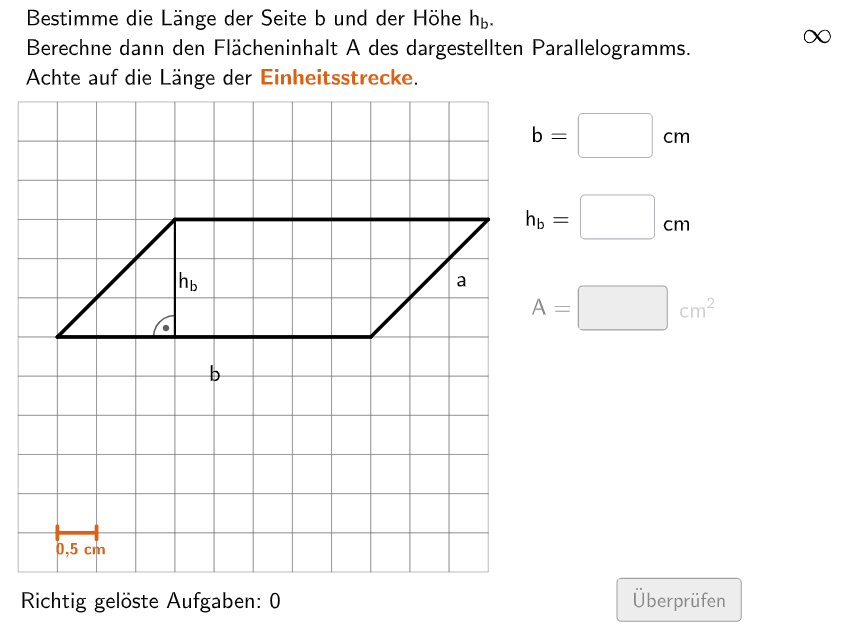
This example demonstrates how to calculate the area of a parallelogram in a coordinate grid. Key mathematical concepts include the area formula for parallelograms (base × height), geometric interpretation of grid coordinates, and the relationship between vector cross product and area. Construction highlights: Using Polygon command to construct the parallelogram, Segment for auxiliary lines showing base and height, Translate/Midpoint for geometric transformations, Random/Shuffle for generating random coordinates, and InputBox for interactive validation. Suitable for grades 5-6, this activity helps students master area formulas for special quadrilaterals and develops geometric intuition through coordinate visualization.
GeoGebra Commands & Parameters
Shuffle(Sequence[Random[7, coordheight - 2], m, 1, 100]) → randomNosForX, {7, 8, 8, 8, 8, 10, 7, 8, 8, 9, 7, 8, 7, 10, 8, 7, 7, 7, 10, 7, 7, 7, 10, 7, 7, 8, 7, 7, 7, 8, 7, 7, 7, 10, 10, 9, 10, 10, 10, 9, 8, 8, 8, 9, 8, 7, 8, 8, 9, 9, 7, 7, 9, 7, 7, 9, 8, 8, 9, 8, 7, 9, 7, 7, 9, 10, 9, 7, 8, 9, 8, 7, 9, 8, 9, 7, 10, 10, 9, 7, 7, 7, 7, 9, 10, 7, 9, 9, 8, 9, 8, 10, 9, 8, 9, 7, 7, 9, 9, 8}Element(randomNosForX, Mod[questionCount, 100] + 1) → numXShuffle(Sequence[Random[4, coordwidth - 2], m, 1, 100]) → randomNosForY, {7, 10, 7, 9, 6, 8, 7, 9, 4, 10, 9, 4, 8, 4, 6, 10, 10, 7, 7, 6, 8, 5, 9, 9, 9, 9, 6, 9, 6, 8, 9, 5, 10, 9, 8, 10, 8, 4, 9, 7, 10, 6, 7, 7, 6, 8, 5, 4, 10, 10, 9, 10, 9, 6, 10, 8, 7, 7, 5, 10, 6, 8, 6, 7, 4, 7, 5, 6, 4, 6, 8, 9, 4, 6, 9, 10, 5, 8, 10, 4, 10, 6, 5, 6, 10, 10, 8, 6, 10, 8, 4, 6, 7, 5, 10, 7, 8, 7, 6, 10}Element(randomNosForY, Mod[questionCount, 100] + 1) → numYTextfield(input1) → InputBox1Textfield(input2) → InputBox2Shuffle(Sequence[i, i, 6, 12] \ {axold}) → AxList, {12, 10, 9, 11, 8, 6, 7}Shuffle(Sequence[i, i, 1, 12] \ {ax - 2, ax - 1, ax, ax + 1, ax + 2}) → CxList, {1, 8, 4, 7, 6, 9, 2, 5, 3}Shuffle(Sequence[i, i, 2, abs(cx - ax)] \ {abs(cx - ax)}) → LaengeaList, {8, 3, 7, 5, 2, 6, 4, 9, 10}Shuffle(Sequence[i, i, 1, 9] \ {ayold}) → AyList, {9, 4, 2, 7, 6, 8, 3, 1, 5}Shuffle(Sequence[i, i, 1, 12] \ {ay - 2, ay - 1, ay, ay + 1, ay + 2}) → CyList, {6, 1, 12, 3, 2, 5, 4}If(cx < ax, C + (size * (laengea, 0)), C - (size * (laengea, 0))) → BIf(cx < ax, A - (size * (laengea, 0)), A + (size * (laengea, 0))) → DPolygon(C, B, A, D) → v2, j, k, l, mOrthogonalLine(D, l) → nIntersect(n, Line[C, B]) → ESegment(D, E) → pShuffle({0.5, 1.5, 2, 3}) → EinheitsLList, {0.5, 2, 1.5, 3}Polygon(PtopLeftCornerFeedback, PtopRightCornerFeedback, PbottomRightCornerFeedback, PbottomLeftCornerFeedback) → rectangleCorrect, rectangleCorrectS3, rectangleCorrectS4, rectangleCorrectS2, rectangleCorrectS1Append(true, Sequence[If[randomNosForX(i) ≟ randomNosForX(i - 1), false, true], i, 2, 100]) → stayXAppend(true, Sequence[If[randomNosForY(i) ≟ randomNosForY(i - 1), false, true], i, 2, 100]) → stayYRemove(Sequence[If[stayX(i), randomNosForX(i), 0], i, 1, 100], Sequence[0, i, 1, 100]) → randomNosForXwithoutRepeatRemove(Sequence[If[stayY(i), randomNosForY(i), 0], i, 1, 100], Sequence[0, i, 1, 100]) → randomNosForYwithoutRepeatElement(randomNosForXwithoutRepeat, Mod[questionCount, Length[randomNosForXwithoutRepeat]] + 1) → numXwithoutRepeatElement(randomNosForYwithoutRepeat, Mod[questionCount, Length[randomNosForYwithoutRepeat]] + 1) → numYwithoutRepeatDefined(input3) → fixedFlatten(Sequence[Sequence[O + (m * (size, 0)) + (j * (0, size)), m, 0, coordwidth - 1], j, 0, coordheight - 1]) → listPointsZip(Polygon[P, P + (0, size), P + (0, size) + (size, 0), P + (size, 0)], P, listPoints) → listCoordsSegment(P1, P3) → esRandom(2, numX - 2) → propSegment(P4, P2) → fsSegment(G1, G2) → gTranslate(Segment[(0, -0.1), (0, 0.1)], G1) → hTranslate(Segment[(0, -0.1), (0, 0.1)], G2) → iIntersect(es, fs) → STextfield(input3) → InputBox3Shuffle({1, 2}) → ModusList, {2, 1}If(y(C) < y(D), Midpoint[C, B], Midpoint[D, A]) → MittelpunktUntenIf(x(A) > x(D), Midpoint[A, B], Midpoint[D, C]) → MittelpunktRechtsMidpoint(D, B) → MText(BeschTextb, F, false, true, 0, 0) → Text3Text(BeschTexta, G, false, true, 0, 0) → Text4If(x(E) > x(B) ∧ y(B) > y(A) ∨ x(B) < x(E) ∧ y(B) < y(A), Midpoint[p] - (0.2, 0), Midpoint[p] + (0.2, 0)) → HText(BeschTexth, H, false, true, 0, 0) → Text8Segment(C, E) → hintCESegment(B, E) → hintBEAngle(A, D, E) → αAngle(C, E, D) → βAngle(D, E, C) → γAngle(E, D, A) → δDistance(H, F) → diffIf(x(A) < x(D), Midpoint[A, B], Midpoint[D, C]) → MittelpunktLinksText(BeschTextb, I, false, true, 0, 0) → Text16
AI Drawing Prompt Reference
Draw a parallelogram on a coordinate grid. Start by randomly selecting two points for the base and height, then construct the four vertices of the parallelogram. Draw auxiliary lines for the base and height, label the area formula, and calculate the area. Finally, add some auxiliary lines and angle markings to help understand the geometric relationships of the parallelogram.
The prompt above was compiled from the original drawing commands and is for reference only.