
HMT & Vector Magnitude Visualization
Loading the math board and drawing, please wait…
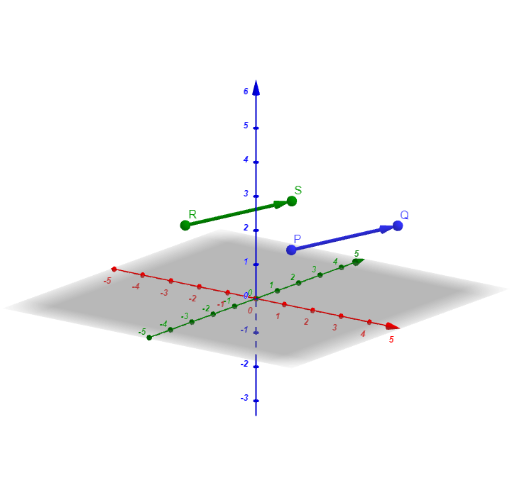
This GeoGebra example demonstrates how vector magnitude (length) and directional information can be visualized through a geometric construction that links points and constructed vectors. It highlights the geometry behind comparing sizes of vector-related quantities and how changing input parameters affects positions and measured lengths. Key math concepts include vectors (Vector), working with vector components, and magnitude (magnitude/length) as a quantitative geometric measure; the setup also supports interpreting related quadrilateral/trapezoid configurations and middle quantities that connect naturally with arithmetic mean ideas. Construction focuses on combining the GeoGebra commands Vector and Textfield with interactive inputs: the model defines points (e.g., R, S, P, Q), vector variables (u, v), and multiple InputBox-driven component parameters (ux, uy, uz, vx, vy, vz), along with on-screen labels (text1, text2, text3, and additional symbols like a, b, c) to display both numeric parameters and geometric relationships. Suitable for high school through early university curricula, especially for teaching vector magnitude, coordinate/analytic geometry connections, and interactive geometry visualization.
GeoGebra Commands & Parameters
Vector(R, S) → uVector(P, Q) → vTextfield(P) → InputBox1Textfield(Q) → InputBox2Textfield(R) → InputBox3Textfield(S) → InputBox4Textfield(ux) → InputBox5Textfield(uy) → InputBox6Textfield(uz) → InputBox7Vector((0, 0, 0), (ux, uy, uz)) → wTextfield(vx) → InputBox8Textfield(vy) → InputBox9Textfield(vz) → InputBox10Vector((0, 0, 0), (vx, vy, vz)) → bTextfield(a) → InputBox11Textfield(c) → InputBox12
AI Drawing Prompt Reference
Draw a figure with four points R, S, P, and Q. Use vectors u and v to represent the vectors from point R to S and from point P to Q. Input the components of vector u (ux, uy, uz) and vector v (vx, vy, vz) using input boxes to generate vectors w and b. Add labels to the figure to display the length and direction of the vectors, as well as the input component values.
The prompt above was compiled from the original drawing commands and is for reference only.