
Measuring Angles, Slopes, and Distances with Construction
Loading the math board and drawing, please wait…
In collections
Authomath GeoGebra Basics Course
This example demonstrates how to measure and explore geometric quantities—angles, slopes, and distances—within a constructed figure. It connects the visual geometry with quantitative results by focusing on the relationships among lines and segments defined by several points. The key math concepts are: angle measurement (direction and opening), slope as a geometric description of line inclination, and distance as the metric given by segment lengths (often supporting comparisons and derived relations). Construction-wise, the provided GeoGebra command summary indicates the use of geometry construction primitives such as Segment and Midpoint to create and connect key points (A, B, C, D, etc.) and to compute midpoints that serve as reference positions for subsequent measurements. The setup is suitable for middle and high school geometry and coordinate geometry lessons, and it works well for interactive classroom demonstrations and self-study on converting geometric configurations into measurable parameters.
GeoGebra Commands & Parameters
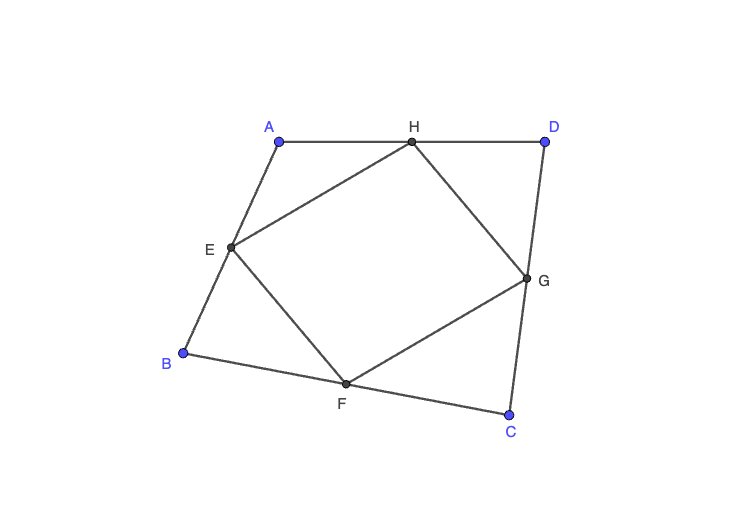
Segment(A, B) → fSegment(B, C) → gSegment(C, D) → hSegment(D, A) → iMidpoint(f) → EMidpoint(g) → FMidpoint(h) → GMidpoint(i) → HSegment(E, F) → jSegment(F, G) → kSegment(G, H) → lSegment(H, E) → m
AI Drawing Prompt Reference
Draw a quadrilateral formed by points A, B, C, and D, connecting them to form four sides. Then find the midpoints of each side and connect these midpoints to form a smaller internal quadrilateral. Show these figures and explain the relationship between the outer and inner quadrilaterals.
The prompt above was compiled from the original drawing commands and is for reference only.