
Vector View of Steiner Point in a Triangular Configuration
Loading the math board and drawing, please wait…
In collections
Besondere Punkte/Special Points
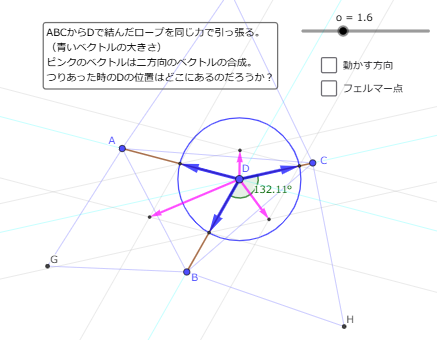
This GeoGebra example visualizes the relationship between vectors and the Steiner point (施泰纳点) in a triangular geometric setup associated with an equilateral-triangle–type configuration. It demonstrates how the Steiner point can be identified and verified through angle conditions, constructed auxiliary lines/circles, and vector relations that encode directions and lengths. The key mathematical ideas include: vector geometry, the defining geometric properties of the Steiner point in a triangle (minimizing the sum of distances to the vertices), angle bisectors and angle measurement, and circle intersections to locate special points precisely. Construction highlights: it uses Line to draw main lines, Angle to measure/track required angles, Polygon to build triangular/parallelogram-like regions, Circle and Intersect to compute circle intersection points, and Vector plus Segment to depict and confirm vector/segment relationships; LineBisector is used to construct angle bisectors that drive the Steiner-point characterization. The objects (multiple points such as A, B, C, G, H, E, F, I, plus auxiliary parameters like α and polygon groups) organize the intermediate steps from construction to verification. Suitable for high school–level geometry enrichment and early university coursework on geometric construction, vector methods, and distance-minimization intuition.
GeoGebra Commands & Parameters
Line(A, D) → fLine(D, C) → gLine(D, B) → hAngle(B, D, C) → αPolygon(B, A, 3) → poly1, p, q, r, GPolygon(C, B, 3) → poly2, s, t, a, HCircle(B, H, C) → cCircle(A, G, B) → dCircle(D, o) → eIntersect(e, f, 1) → EIntersect(e, h, 1) → FIntersect(e, g, 1) → ILine(E, h) → iLine(F, f) → jIntersect(i, j) → JLine(I, h) → kLine(F, g) → lIntersect(k, l) → KVector(D, J) → uVector(D, K) → vLine(E, g) → mLine(I, f) → nIntersect(m, n) → LVector(D, L) → wVector(D, E) → bVector(D, I) → u_1Vector(D, F) → v_1Polygon(A, C, 3) → poly3, f_1, g_1, h_1, MCircle(M, A, C) → c_1Segment(D, A) → i_1Segment(D, C) → j_1Segment(D, B) → k_1Circle(J, K, L) → d_1LineBisector(L, K) → l_1LineBisector(J, L) → m_1Intersect(l_1, m_1) → NVector(D, N) → w_1
AI Drawing Prompt Reference
Draw an equilateral triangle and label its vertices. Connect one vertex to the other two with line segments. Measure the angles formed and draw the angle bisectors. Construct two auxiliary polygons based on the triangle's sides. Draw two circles with diameters equal to the triangle's sides and find their intersection points. Connect these points to the triangle's vertices to form multiple auxiliary line segments and new intersection points. Measure and label the angles between these points, verifying their relationships with the angle bisectors. Finally, represent the line segments as vectors and check if their lengths and directions satisfy the geometric conditions.
The prompt above was compiled from the original drawing commands and is for reference only.