
Comparing Fractions by Guillermo Bautista
Loading the math board and drawing, please wait…
In collections
Elementary School
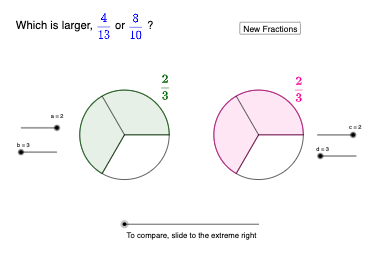
This example demonstrates how to compare fractions using dynamic geometry. It involves core math concepts like fractions, geometric representation, and comparison methods. Constructed with GeoGebra commands and objects such as Point, Circle, Rotate, Angle, Polygon, Segment, CircleSector, Vector, Translate, Random. Suitable for middle school students and above to understand fraction comparison visually, or for math teaching demonstrations.
GeoGebra Commands & Parameters
Point(xAxis) → ACircle(A, 1) → c_{4}Point(xAxis) → BCircle(B, 1) → d_{2}Point(c_{4}) → CRotate(C, alpha1, A) → C'Angle(C, A, C') → αPolygon(C, C', b) → poly1, f, q, r, s, t, a_{2}, b_{2}, e, f_1, g_1, h_1, g, i_1, D, E, F, G, H, I, J, K, L, h, M, N, O, P, Q, R, S, T, U, i, j, k, l, n, pSegment(A, C) → j_1Segment(A, C') → k_1Segment(A, D) → l_1Segment(A, U) → m_1Segment(A, T) → n_1Segment(A, S) → p_1Segment(A, R) → q_1Segment(A, Q) → r_1Segment(A, P) → s_1Segment(A, O) → t_1Segment(A, N) → a_1Segment(A, M) → b_1Segment(A, L) → c_1Segment(A, K) → d_1Segment(A, J) → e_1Segment(A, I) → f_2Segment(A, H) → g_2Segment(A, G) → h_2Segment(A, F) → i_2Segment(A, E) → j_2Rotate(C, (alpha1 * a), A) → C'_{1}CircleSector(A, C, C'_{1}) → c_2Point(d_{2}) → VRotate(V, beta1, B) → V'Polygon(V, V', d) → poly2, m, t_2, e_2, f_3, g_3, h_3, i_3, j_3, k_3, l_3, m_3, k_2, n_3, W, Z, A_1, B_1, C_1, D_1, E_1, F_1, G_1, l_2, H_1, I_1, J_1, K_1, L_1, M_1, N_1, O_1, P_1, m_2, n_2, p_2, q_2, r_2, s_2Segment(D_1, B) → p_3Segment(C_1, B) → q_3Segment(B_1, B) → r_3Segment(A_1, B) → s_3Segment(Z, B) → t_3Segment(W, B) → a_3Segment(V', B) → b_3Segment(V, B) → c_3Segment(B, P_1) → d_3Segment(B, O_1) → e_3Segment(B, N_1) → f_4Segment(B, M_1) → g_4Segment(B, L_1) → h_4Segment(B, K_1) → i_4Segment(B, J_1) → j_4Segment(B, I_1) → k_4Segment(B, H_1) → l_4Segment(B, G_1) → m_4Segment(F_1, B) → n_4Segment(E_1, B) → p_4Rotate(V, (c * beta1), B) → V'_{1}Angle(V, B, V'_{1}) → βCircleSector(B, V, V'_{1}) → d_4Segment(Q_1, R_1) → q_4Point(q_4) → S_1Vector(Q_1, S_1) → uTranslate(c_2, u) → e_4Random(2, 20) → den1Random(1, den1 - 1) → num1Random(2, 20) → den2Random(1, den2 - 1) → num2
AI Drawing Prompt Reference
Create a dynamic geometry diagram to compare fractions, featuring two concentric circles and a rotating triangle, demonstrating fraction size through rotation angles and sector areas. Start by drawing two circles with radius 1, then take a point on the first circle and rotate it to form a triangle. Use a sector to represent the fraction part, and compare two fractions by rotating a point on the second circle.
The prompt above was compiled from the original drawing commands and is for reference only.