
Truncated Cube
Loading the math board and drawing, please wait…
In collections
Archimedean Solids
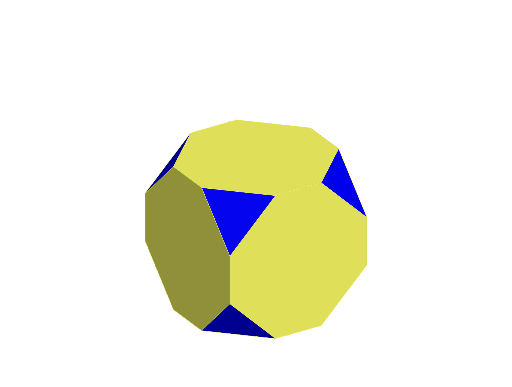
This example demonstrates the geometric construction and properties of a truncated cube. It involves core mathematical concepts such as polygons, solid geometry, and similarity transformations. The construction uses GeoGebra commands like Point, Cube, Sphere, Intersect, Polygon, and Rotate to form the truncated cube. It is suitable for high school and above students to learn about polyhedron transformations.
GeoGebra Commands & Parameters
Point(Circle[B, Distance[A, B], Segment[A, B]]) → CPoint(Circle[B, Distance[A, B], Segment[A, B]]) → DCube(A, B, D) → a, E, faceDEIH, faceFGHI, edgeAE, edgeAB, edgeBD, edgeDE, edgeAF, edgeEI, edgeFI, edgeFG, F, edgeBG, edgeGH, edgeDH, edgeHI, G, H, I, faceABDE, faceAEIF, faceABGF, faceBDHGSphere(F, Distance[A, B] / 3) → bIntersect(edgeFI, b, 1) → JIntersect(edgeFG, b, 1) → KIntersect(edgeAF, b, 1) → LPolygon(J, L, K) → t1, k, j, lRotate(t1, 90°, zAxis) → t1'Rotate(t1, 180°, zAxis) → t1'_{1}Rotate(t1, 270°, zAxis) → t1'_{2}Rotate(t1, -90°, xAxis) → t1'_{3}Rotate(t1'_{3}, 90°, zAxis) → t2Rotate(t1'_{3}, 180°, zAxis) → t3Rotate(t1'_{3}, 270°, zAxis) → t4Rotate(J, 90°, zAxis) → J'Rotate(L, 90°, zAxis) → L'Rotate(K, -90°, xAxis) → K'Rotate(J', -90°, xAxis) → J''Rotate(L', -90°, xAxis) → L''Rotate(J, -90°, xAxis) → J'_{1}Rotate(J, 90°, zAxis) → J'_{2}Rotate(K, 90°, zAxis) → K'_{1}Rotate(K'_{1}, -90°, xAxis) → MPolygon(K, L, J'_{1}, K', J'', M, L', J'_{2}) → poly1, k_1, l_1, j'_{1}, k', j'', m, l', j'_{2}Rotate(poly1, 90°, zAxis) → poly1'Rotate(poly1, 180°, zAxis) → poly1'_{1}Rotate(poly1, 270°, zAxis) → poly1'_{2}Rotate(poly1', 90°, yAxis) → poly1''Rotate(poly1', 270°, yAxis) → poly1''_{1}
AI Drawing Prompt Reference
Draw a truncated cube by first creating a cube, then drawing a sphere at one of the cube's vertices, finding the intersections of the cube's edges with the sphere, forming new polygons, and rotating these polygons to create the faces of the truncated cube.
The prompt above was compiled from the original drawing commands and is for reference only.