
Tessellation from Triangle by abbey (2)
Loading the math board and drawing, please wait…
In collections
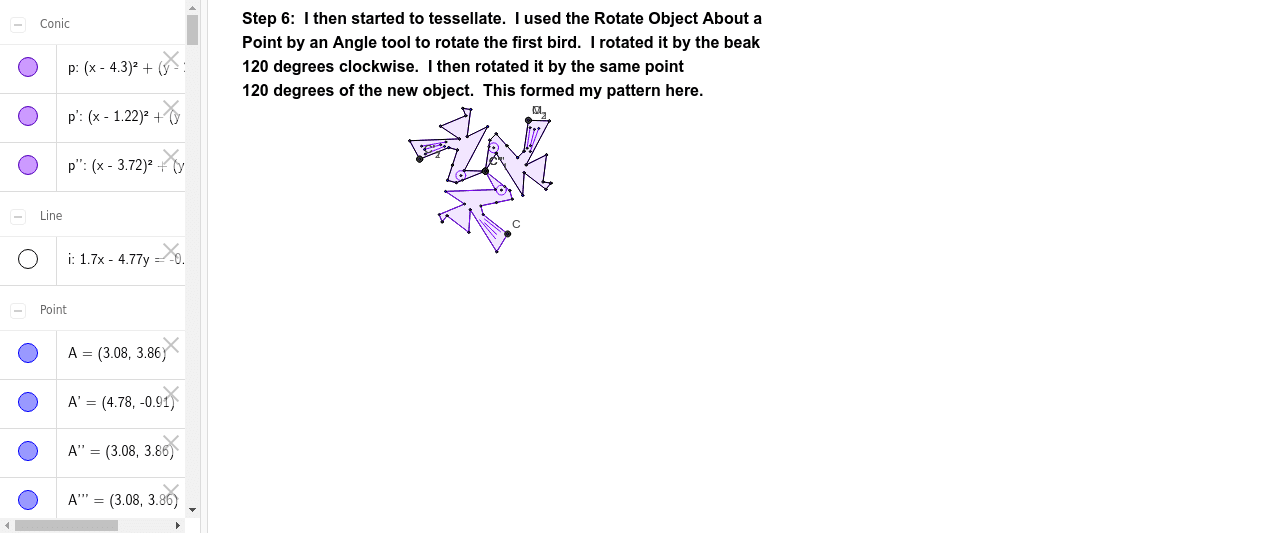
Tessellation from Triangle using Rotation
This example demonstrates how to generate a tessellation pattern by rotating a triangle. Key mathematical concepts include rotation, angles, and geometric construction. It uses commands like Polygon, Segment, Rotate, LineBisector, and Intersect in GeoGebra. Suitable for middle school and above students to learn geometric transformations and tessellations.
GeoGebra Commands & Parameters
Polygon(A, B, 3) → poly1, a, b, c, CSegment(B, D) → dSegment(D, E) → eSegment(E, F) → fSegment(F, G) → gSegment(G, A) → hRotate(A, 300*°, B) → A'Rotate(B, 300*°, B) → B'Segment(A', B') → a'Rotate(B, 300*°, B) → B'_1Rotate(D, 300*°, B) → D'Segment(B'_1, D') → d'Rotate(D, 300*°, B) → D'_1Rotate(E, 300*°, B) → E'Segment(D'_1, E') → e'Rotate(E, 300*°, B) → E'_1Rotate(F, 300*°, B) → F'Segment(E'_1, F') → f'Rotate(F, 300*°, B) → F'_1Rotate(G, 300*°, B) → G'Segment(F'_1, G') → g'Rotate(G, 300*°, B) → G'_1Rotate(A, 300*°, B) → A'_1Segment(G'_1, A'_1) → h'LineBisector(c) → iIntersect(i, c) → HPoint(i) → ISegment(H, J) → jSegment(J, K) → kSegment(K, C) → lRotate(G'_1, 180*°, H) → LRotate(A'_1, 180*°, H) → MRotate(H, 180*°, H) → H'Rotate(J, 180*°, H) → J'Segment(H', J') → j'Rotate(J, 180*°, H) → J'_1Rotate(K, 180*°, H) → K'Segment(J'_1, K') → k'Rotate(K, 180*°, H) → K'_1Rotate(C, 180*°, H) → C'Segment(K'_1, C') → l'Rotate(A', 180*°, H) → A''Rotate(G', 180*°, H) → G''Polygon(F', G', E, D, B, D', E', C, K, J, H, K', A, G, F) → poly2, f'_1, f_1, e_1, d_1, b_1, d'_1, e'_1, g'_1, c_1, k_1, j_1, h_1, k'_1, a_1, g_1Polygon(A, G, C, K, J, H, J', K', F, E, D, B, D', E', F', G') → poly3, a_2, g'_2, c_2, k_2, j_2, h_2, j'_1, k'_2, g_2, f_2, e_2, d_2, b_2, d'_2, e'_2, f'_2Point(l') → OCircle(N, O) → pSegment(P, Q) → mSegment(S, R) → nSegment(T, U) → qRotate(A, 240*°, A) → A'_2Rotate(G, 240*°, A) → G'_2Rotate(F, 240*°, A) → F'_2Rotate(E, 240*°, A) → E'_2Rotate(D, 240*°, A) → D'_2Rotate(B, 240*°, A) → B'_2Rotate(D', 240*°, A) → D''Rotate(E', 240*°, A) → E''Rotate(F', 240*°, A) → F''Rotate(G', 240*°, A) → G''_1Rotate(C, 240*°, A) → C'_1Rotate(K, 240*°, A) → K'_2Rotate(J, 240*°, A) → J'_2Rotate(H, 240*°, A) → H'_1Rotate(J', 240*°, A) → J''Rotate(K', 240*°, A) → K''Polygon(A'_2, G'_2, C'_1, K'_2, J'_2, H'_1, J'', K'', F'_2, E'_2, D'_2, B'_2, D'', E'', F'', G''_1) → poly3', a'_2, g''_1, c'_1, k'_3, j'_2, h'_1, j'', k'', g'_3, f'_3, e'_3, d'_3, b'_2, d'', e'', f''Rotate(p, 240*°, A) → p'Rotate(B, 240*°, A) → B'_3Rotate(D, 240*°, A) → D'_3Segment(B'_3, D'_3) → d'_4Rotate(D, 240*°, A) → D'_4Rotate(E, 240*°, A) → E'_3Segment(D'_4, E'_3) → e'_4Rotate(E, 240*°, A) → E'_4Rotate(F, 240*°, A) → F'_3Segment(E'_4, F'_3) → f'_4Rotate(F, 240*°, A) → F'_4Rotate(G, 240*°, A) → G'_3Segment(F'_4, G'_3) → g'_4Rotate(G, 240*°, A) → G'_4Rotate(A, 240*°, A) → A'_3Segment(G'_4, A'_3) → h'_2Rotate(B'_1, 240*°, A) → VRotate(D', 240*°, A) → D''_1Segment(V, D''_1) → d''_1Rotate(D'_1, 240*°, A) → WRotate(E', 240*°, A) → E''_1Segment(W, E''_1) → e''_1Rotate(E'_1, 240*°, A) → ZRotate(F', 240*°, A) → F''_1Segment(Z, F''_1) → f''_1Rotate(F'_1, 240*°, A) → A_1Rotate(G', 240*°, A) → G''_2Segment(A_1, G''_2) → g''Rotate(G'_1, 240*°, A) → B_1Rotate(A'_1, 240*°, A) → C_1Segment(B_1, C_1) → h''Rotate(H, 240*°, A) → H'_2Rotate(J, 240*°, A) → J'_3Segment(H'_2, J'_3) → j'_3Rotate(J, 240*°, A) → J'_4Rotate(K, 240*°, A) → K'_3Segment(J'_4, K'_3) → k'_4Rotate(K, 240*°, A) → K'_4Rotate(C, 240*°, A) → C'_2Segment(K'_4, C'_2) → l'_1Rotate(H', 240*°, A) → H''Rotate(J', 240*°, A) → J''_1Segment(H'', J''_1) → j''_1Rotate(J'_1, 240*°, A) → D_1Rotate(K', 240*°, A) → K''_1Segment(D_1, K''_1) → k''_1Rotate(K'_1, 240*°, A) → E_1Rotate(C', 240*°, A) → C''Segment(E_1, C'') → l''Rotate(P, 240*°, A) → P'Rotate(Q, 240*°, A) → Q'Segment(P', Q') → m'Rotate(S, 240*°, A) → S'Rotate(R, 240*°, A) → R'Segment(S', R') → n'Rotate(T, 240*°, A) → T'Rotate(U, 240*°, A) → U'Segment(T', U') → q'Rotate(A', 240*°, A) → A''_1Rotate(B', 240*°, A) → B''Rotate(M, 240*°, A) → M'Rotate(A'', 240*°, A) → A'''Rotate(N, 240*°, A) → N'Rotate(O, 240*°, A) → O'Rotate(A'_2, 240*°, A) → F_1Rotate(G'_2, 240*°, A) → G_1Rotate(F'_2, 240*°, A) → H_1Rotate(E'_2, 240*°, A) → I_1Rotate(D'_2, 240*°, A) → J_1Rotate(B'_2, 240*°, A) → K_1Rotate(D'', 240*°, A) → D'''Rotate(E'', 240*°, A) → E'''Rotate(F'', 240*°, A) → F'''Rotate(G''_1, 240*°, A) → L_1Rotate(C'_1, 240*°, A) → M_1Rotate(K'_2, 240*°, A) → N_1Rotate(J'_2, 240*°, A) → O_1Rotate(H'_1, 240*°, A) → P_1Rotate(J'', 240*°, A) → J'''Rotate(K'', 240*°, A) → K'''Polygon(F_1, G_1, M_1, N_1, O_1, P_1, J''', K''', H_1, I_1, J_1, K_1, D''', E''', F''', L_1) → poly3'', f_3, l_1, m_1, n_1, o_1, p_1, j''', k''', g_3, h_3, i_1, j_3, k_3, d''', e''', f'''Rotate(p', 240*°, A) → p''Rotate(B'_3, 240*°, A) → Q_1Rotate(D'_3, 240*°, A) → R_1Segment(Q_1, R_1) → rRotate(D'_4, 240*°, A) → S_1Rotate(E'_3, 240*°, A) → T_1Segment(S_1, T_1) → sRotate(E'_4, 240*°, A) → U_1Rotate(F'_3, 240*°, A) → V_1Segment(U_1, V_1) → tRotate(F'_4, 240*°, A) → W_1Rotate(G'_3, 240*°, A) → Z_1Segment(W_1, Z_1) → q_1Rotate(G'_4, 240*°, A) → A_2Rotate(A'_3, 240*°, A) → B_2Segment(A_2, B_2) → r_1Rotate(V, 240*°, A) → V'Rotate(D''_1, 240*°, A) → C_2Segment(V', C_2) → s_1Rotate(W, 240*°, A) → W'Rotate(E''_1, 240*°, A) → D_2Segment(W', D_2) → t_1Rotate(Z, 240*°, A) → Z'Rotate(F''_1, 240*°, A) → E_2Segment(Z', E_2) → i_2Rotate(A_1, 240*°, A) → F_2Rotate(G''_2, 240*°, A) → G_2Segment(F_2, G_2) → g'''Rotate(B_1, 240*°, A) → H_2Rotate(C_1, 240*°, A) → I_2Segment(H_2, I_2) → h'''Rotate(H'_2, 240*°, A) → J_2Rotate(J'_3, 240*°, A) → K_2Segment(J_2, K_2) → l_2Rotate(J'_4, 240*°, A) → L_2Rotate(K'_3, 240*°, A) → M_2Segment(L_2, M_2) → m_2Rotate(K'_4, 240*°, A) → N_2Rotate(C'_2, 240*°, A) → O_2Segment(N_2, O_2) → n_2Rotate(H'', 240*°, A) → H'''Rotate(J''_1, 240*°, A) → P_2Segment(H''', P_2) → p_2Rotate(D_1, 240*°, A) → Q_2Rotate(K''_1, 240*°, A) → R_2Segment(Q_2, R_2) → q_2Rotate(E_1, 240*°, A) → S_2Rotate(C'', 240*°, A) → C'''Segment(S_2, C''') → l'''Rotate(P', 240*°, A) → P''Rotate(Q', 240*°, A) → Q''Segment(P'', Q'') → m''Rotate(S', 240*°, A) → S''Rotate(R', 240*°, A) → R''Segment(S'', R'') → n''Rotate(T', 240*°, A) → T''Rotate(U', 240*°, A) → U''Segment(T'', U'') → q''Rotate(M, 240*°, A) → M'_1Rotate(C', 240*°, A) → C''_1Rotate(A'', 240*°, A) → A'''_1Rotate(A''_1, 240*°, A) → T_2Rotate(B'', 240*°, A) → B'''Rotate(M', 240*°, A) → M''Rotate(A''', 240*°, A) → U_2Rotate(N', 240*°, A) → N''Rotate(O', 240*°, A) → O''
AI Drawing Prompt Reference
Draw a triangle and rotate it around one vertex three times, each time by 120 degrees, to create six connected triangles forming a hexagon. Then, combine these triangles into a larger hexagon and draw a central symmetric pattern inside it, including diagonals and midpoints. Finally, add some decorative arcs and lines to enrich the design.
The prompt above was compiled from the original drawing commands and is for reference only.