
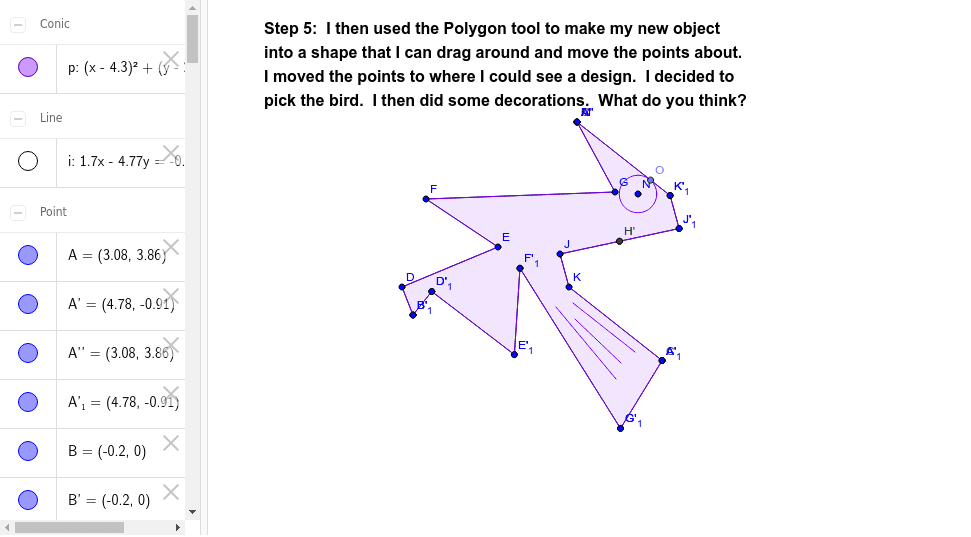
Tessellation from Triangle (Step 5)
Loading the math board and drawing, please wait…
In collections
Tessellation from Triangle using Rotation
This example demonstrates the geometric construction process of creating a plane tessellation through rotating triangles. It involves core mathematical concepts such as rotation, geometric distribution, sequences and series, rectangles, unit circles, and sine functions. The construction highlights the use of GeoGebra commands and objects like Polygon, Segment, Rotate, LineBisector, Intersect, Point, and Circle. It is suitable for high school mathematics education, illustrating geometric transformations and the generation of tessellation patterns to enhance understanding of transformations, geometric distribution, and the application of sequences.
GeoGebra Commands & Parameters
Polygon(A, B, 3) → poly1, a, b, c, CSegment(B, D) → dSegment(D, E) → eSegment(E, F) → fSegment(F, G) → gSegment(G, A) → hRotate(A, 300*°, B) → A'Rotate(B, 300*°, B) → B'Segment(A', B') → a'Rotate(B, 300*°, B) → B'_1Rotate(D, 300*°, B) → D'Segment(B'_1, D') → d'Rotate(D, 300*°, B) → D'_1Rotate(E, 300*°, B) → E'Segment(D'_1, E') → e'Rotate(E, 300*°, B) → E'_1Rotate(F, 300*°, B) → F'Segment(E'_1, F') → f'Rotate(F, 300*°, B) → F'_1Rotate(G, 300*°, B) → G'Segment(F'_1, G') → g'Rotate(G, 300*°, B) → G'_1Rotate(A, 300*°, B) → A'_1Segment(G'_1, A'_1) → h'LineBisector(c) → iIntersect(i, c) → HPoint(i) → ISegment(H, J) → jSegment(J, K) → kSegment(K, C) → lRotate(G'_1, 180*°, H) → LRotate(A'_1, 180*°, H) → MRotate(H, 180*°, H) → H'Rotate(J, 180*°, H) → J'Segment(H', J') → j'Rotate(J, 180*°, H) → J'_1Rotate(K, 180*°, H) → K'Segment(J'_1, K') → k'Rotate(K, 180*°, H) → K'_1Rotate(C, 180*°, H) → C'Segment(K'_1, C') → l'Rotate(A', 180*°, H) → A''Rotate(G', 180*°, H) → G''Polygon(F', G', E, D, B, D', E', C, K, J, H, K', A, G, F) → poly2, f'_1, f_1, e_1, d_1, b_1, d'_1, e'_1, g'_1, c_1, k_1, j_1, h_1, k'_1, a_1, g_1Polygon(A, G, C, K, J, H, J', K', F, E, D, B, D', E', F', G') → poly3, a_2, g'_2, c_2, k_2, j_2, h_2, j'_1, k'_2, g_2, f_2, e_2, d_2, b_2, d'_2, e'_2, f'_2Point(l') → OCircle(N, O) → pSegment(P, Q) → mSegment(S, R) → nSegment(T, U) → q
AI Drawing Prompt Reference
Draw a plane tessellation created by rotating triangles, showing the geometric construction process. Start with a triangle, then rotate it around one vertex three times, each time by 120 degrees, and connect the rotated vertices to form a new polygon. Next, draw circles centered at the rotation point and add auxiliary line segments at the intersection points. Finally, combine all parts to create a complete tessellation pattern, highlighting the principles of geometric transformation and distribution.
The prompt above was compiled from the original drawing commands and is for reference only.