
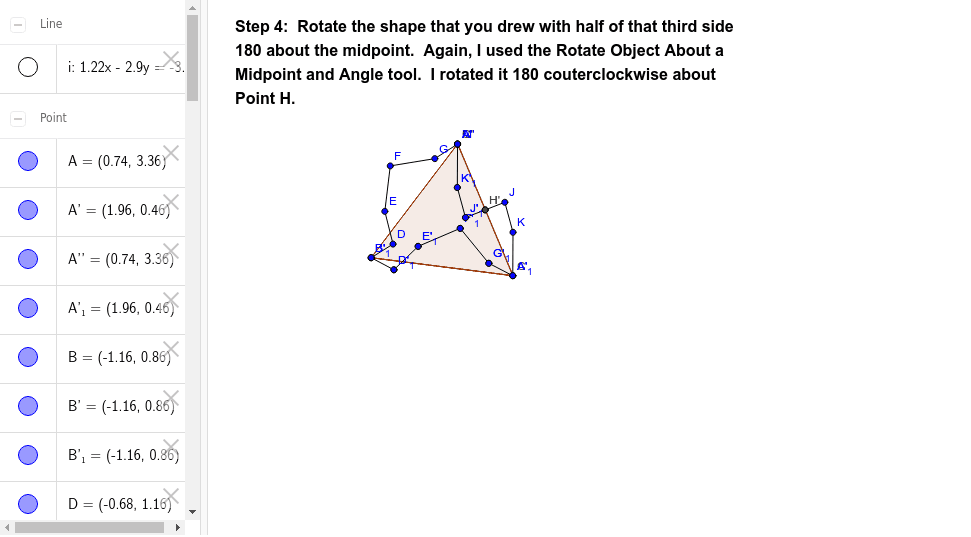
Tessellation from Triangle (Step 4)
Loading the math board and drawing, please wait…
In collections
Tessellation from Triangle using Rotation
This example demonstrates the process of constructing a tessellation pattern by rotating a triangle. It involves core mathematical concepts such as rotation, angles, geometric mean, orthocenter, and ratios. The construction uses commands like Polygon, Segment, Rotate, LineBisector, Intersect, and Point in GeoGebra. Suitable for high school mathematics teaching or for those interested in geometric constructions.
GeoGebra Commands & Parameters
Polygon(A, B, 3) → poly1, a, b, c, CSegment(B, D) → dSegment(D, E) → eSegment(E, F) → fSegment(F, G) → gSegment(G, A) → hRotate(A, 300*°, B) → A'Rotate(B, 300*°, B) → B'Segment(A', B') → a'Rotate(B, 300*°, B) → B'_1Rotate(D, 300*°, B) → D'Segment(B'_1, D') → d'Rotate(D, 300*°, B) → D'_1Rotate(E, 300*°, B) → E'Segment(D'_1, E') → e'Rotate(E, 300*°, B) → E'_1Rotate(F, 300*°, B) → F'Segment(E'_1, F') → f'Rotate(F, 300*°, B) → F'_1Rotate(G, 300*°, B) → G'Segment(F'_1, G') → g'Rotate(G, 300*°, B) → G'_1Rotate(A, 300*°, B) → A'_1Segment(G'_1, A'_1) → h'LineBisector(c) → iIntersect(i, c) → HPoint(i) → ISegment(H, J) → jSegment(J, K) → kSegment(K, C) → lRotate(G'_1, 180*°, H) → LRotate(A'_1, 180*°, H) → MRotate(H, 180*°, H) → H'Rotate(J, 180*°, H) → J'Segment(H', J') → j'Rotate(J, 180*°, H) → J'_1Rotate(K, 180*°, H) → K'Segment(J'_1, K') → k'Rotate(K, 180*°, H) → K'_1Rotate(C, 180*°, H) → C'Segment(K'_1, C') → l'Rotate(A', 180*°, H) → A''Rotate(G', 180*°, H) → G''
AI Drawing Prompt Reference
Draw a triangle and rotate it 30 degrees around one of its vertices to create a new triangle. Repeat the rotation for the new triangle to get another one. Connect these three triangles in sequence to form a continuous rotational pattern. For each pair of adjacent triangles, draw the connecting edges and their perpendicular bisectors. Finally, draw a circle that is tangent to the pattern, centered at the intersection of the bisectors.
The prompt above was compiled from the original drawing commands and is for reference only.