
Half of an Equilateral Triangle: Construction and Geometry Relations
Loading the math board and drawing, please wait…
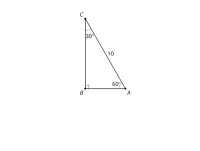
This example demonstrates how to construct and visualize “half of an equilateral triangle” in a dynamic geometry environment, emphasizing how a symmetric full figure can be reduced to a meaningful sub-structure. The key mathematics includes properties of equilateral triangles (equal sides and angles), symmetry and geometric partitioning (selecting one half of the region/boundary), and the idea that related points and segments follow from geometric constraints. The construction typically centers on defining the base endpoints, locating the third vertex so that its distances to both endpoints are equal (thereby forming an equilateral triangle), and then displaying only the portion corresponding to “half” (for instance, the region on one side of a defining line such as the median/partition boundary). Note that the provided source contains no GeoGebra command “construction summary,” so exact commands and object names cannot be extracted from it; implementers should use standard equilateral-triangle construction steps and then use partitioning/visibility to isolate the “half” view. Suitable for middle and high school geometry practice and for classroom demonstrations using GeoGebra.
AI Drawing Prompt Reference
Draw an equilateral triangle and display half of it. First, define the base of the triangle, then locate the third vertex so that it is equidistant from both endpoints of the base, forming an equilateral triangle. Next, split the triangle using a defining line (such as a median) and only show one half of the region to highlight symmetry and geometric partitioning, emphasizing the properties of the equilateral triangle, such as equal sides and angles.
The prompt above was compiled from the original drawing commands and is for reference only.