
Dynamic Introduction to Similar Triangles via Construction
Loading the math board and drawing, please wait…
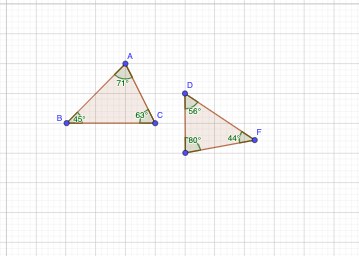
This example demonstrates similar triangles by constructing multiple triangles and using adjustable elements so that the key relationships between corresponding angles and corresponding side lengths remain visible as the configuration changes. It focuses on core ideas of similarity (∠-correspondence and proportionality of corresponding sides). Construction-wise, it uses GeoGebra commands Polygon to build the triangle-shaped polygonal figures from labeled points, and Angle to create and measure the critical angles (e.g., α, β, γ, δ, ε) that support the similarity conditions. The model includes points such as A, B, C, and parameter-related points (t1, t2, D, E1, F), along with auxiliary segment/length-style objects (c, a, b, d, e) to support the geometric setup. Suitable for middle/high-school geometry lessons, interactive explanations, and student self-study on similarity theorems and ratio reasoning.
GeoGebra Commands & Parameters
Polygon(A, B, C) → t1, c, a, bPolygon(D, E_{1}, F) → t2, f, d, eAngle(A, C, B) → αAngle(C, B, A) → βAngle(B, A, C) → γAngle(D, F, E_{1}) → δAngle(E_{1}, D, F) → εAngle(F, E_{1}, D) → E
AI Drawing Prompt Reference
Draw a figure consisting of two similar triangles. The first triangle is formed by points A, B, and C, and the second by points D, E1, and F. The similarity is shown through corresponding angles α, β, γ, δ, and ε. Auxiliary line segments c, a, b, d, and e are included to support the geometric setup. Ensure the figure is clear and easy to understand the concept of similar triangles.
The prompt above was compiled from the original drawing commands and is for reference only.