
Right Triangle Sides Exploration: Dynamic Construction and Pythagorean Verificat
Loading the math board and drawing, please wait…
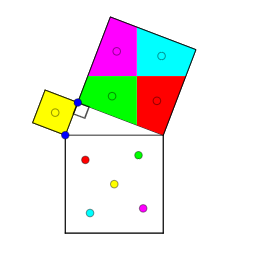
This GeoGebra example presents a dynamic exploration of right triangle side relationships, demonstrating the Pythagorean theorem through interactive construction. It visualizes a right triangle with associated geometric elements, allowing users to manipulate vertices and observe how side lengths relate. Core mathematical concepts include right triangle properties, the Pythagorean theorem, similarity, and geometric transformations such as reflection and translation. The construction utilizes commands like Intersect, Point, Ray, Mirror, Semicircle, CircleArc, Segment, Polygon, Midpoint, OrthogonalLine, Vector, Centroid, Translate, and Angle. Key objects include points A, B, C, segments a, b, c, polygons poly1, poly2, poly3, and various auxiliary lines and points. This resource is suitable for middle and high school students learning geometry and the Pythagorean theorem, as well as for teachers demonstrating dynamic geometric reasoning in the classroom.
GeoGebra Commands & Parameters
Intersect(xAxis, yAxis) → APoint(xAxis) → BRay(A, B) → aPoint(a) → CMirror(C, A) → C'Semicircle(C, C') → cIntersect(c, yAxis) → D,CircleArc(A, D, C) → dPoint(d) → ESegment(C, E) → bSegment(E, C') → eSegment(C', C) → fPolygon(C', C, 4) → poly1, g, h, i, j, F, GPolygon(C, E, 4) → poly2, k, l, m, n, H, IPolygon(E, C', 4) → poly3, p, q, r, s, J, KMidpoint(E, J) → LOrthogonalLine(L, i) → tOrthogonalLine(L, t) → a_1Intersect(a_1, s) → MIntersect(t, r) → NIntersect(a_1, q) → OIntersect(t, e) → PPolygon(M, L, N, K) → poly4, m_1, l_1, n_1, k_1Polygon(L, N, J, O) → poly5, l_2, n_2, j_1, oPolygon(L, P, C', O) → poly6, l_3, p_1, c', o_1Polygon(P, L, M, E) → poly7, p_2, l_4, m_2, e_1Vector(L, C) → uVector(L, F) → vVector(L, C') → wVector(L, G) → u_1Centroid(poly4) → QCentroid(poly5) → RCentroid(poly6) → SCentroid(poly7) → TTranslate(T, w) → T'Translate(S, u) → S'Translate(R, v) → R'Translate(Q, u_1) → Q'Segment(Q, Q') → b_1Segment(R, R') → c_1Segment(S, S') → d_1Segment(T, T') → f_1Point(b_1) → UPoint(c_1) → VPoint(d_1) → WPoint(f_1) → ZVector(Q, U) → v_1Vector(R, V) → w_1Vector(S, W) → g_1Vector(T, Z) → h_1Translate(L, w_1) → L'Translate(N, w_1) → N'Translate(J, w_1) → J'Translate(O, w_1) → O'Polygon(L', N', J', O') → poly5', l', n', j', o'Translate(M, v_1) → M'Translate(L, v_1) → L'_1Translate(N, v_1) → N'_1Translate(K, v_1) → K'Polygon(M', L'_1, N'_1, K') → poly4', m', l'_1, n'_1, k'Translate(L, g_1) → L'_2Translate(P, g_1) → P'Translate(C', g_1) → C''Translate(O, g_1) → O'_1Polygon(L'_2, P', C'', O'_1) → poly6', l'_2, p', c'', o'_1Translate(P, h_1) → P'_1Translate(L, h_1) → L'_3Translate(M, h_1) → M'_1Translate(E, h_1) → E'Polygon(P'_1, L'_3, M'_1, E') → poly7', p'_1, l'_3, m'_1, e'Midpoint(H, C) → A_1Midpoint(C, G) → B_1Segment(A_1, B_1) → i_1Point(i_1) → C_1Vector(A_1, C_1) → q_1Translate(poly2, q_1) → poly2'Angle(C, E, C') → α
AI Drawing Prompt Reference
Draw a right triangle ABC with point A on the x-axis, point B on the y-axis, and point C on the extension of AB. Draw a perpendicular from C to the y-axis, meeting at point D. Draw a circular arc d with A, D, and C as centers. Point E is on arc d, and CE is side b. Draw a perpendicular from C to b, meeting at point F. Draw a circle with C as center and CF as radius, meeting at point G. Draw triangles poly2, poly3, and poly4 with vertices C, E, and G. Connect the midpoints of C, E, and G to L, and draw perpendicular t from L, meeting at points M, N, O, and P. Draw vectors u, v, w, and u_1 from L. Draw the centroids Q, R, S, and T of triangles poly4, poly5, poly6, and poly7 with L as center. Translate T, S, R, and Q along w, u, v, and u_1 to T', S', R', and Q'. Connect Q, Q', R, R', S, S', T, and T' to form sides b_1, c_1, d_1, and f_1.
The prompt above was compiled from the original drawing commands and is for reference only.